How to make an empathy map, with a worked example
Since 2019, this post has introduced its worked example as a UX researcher. The paragraph explained what UX researchers do. It talked about observation techniques and task analysis.
Then came the picture. The picture is Hannah the Hungry Professional. She has just gotten home from work, she does not want to cook, and she is looking at food delivery apps. Task analysis does not come up. Dinner does.
So for about seven years, this post described one person and showed another. That’s a small, funny mistake. It’s also the exact mistake an empathy map exists to prevent: talking confidently about someone without looking at them first.
We’ve fixed the post. Hannah is still hungry.
What an empathy map is, and where it came from
An empathy map is one page that describes a person from the inside out. It collects what they see, hear, say, and do, which you can observe, and what they think and feel, which you mostly have to infer. Along the bottom are their pains and their gains.
Dave Gray and his team designed it at XPLANE, the visual-thinking consultancy. It reached a wide audience in Gamestorming, the 2010 book Gray wrote with Sunni Brown and James Macanufo, and in Alexander Osterwalder’s Business Model Generation, which uses it to fill in the Customer Segments block of the Business Model Canvas. In 2017 Gray published an updated version that adds a goal at the top: who you’re empathizing with, and what they need to do.
Like a persona, an empathy map describes a group of users or a customer segment, not one real individual. Hannah stands in for a lot of tired people with phones.
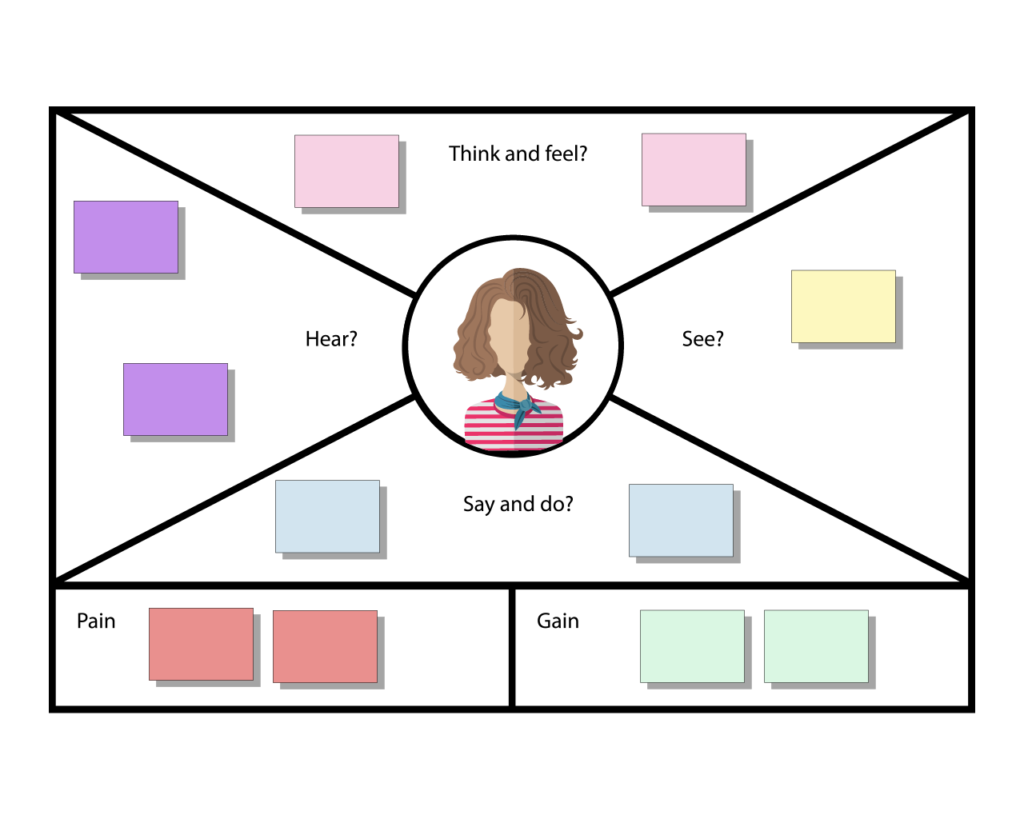
Two versions, and which one we use
There are two common layouts, and it’s worth knowing which one you’re looking at.
The Nielsen Norman Group’s version, from an article titled Empathy Mapping: The First Step in Design Thinking, has four quadrants: Says, Thinks, Does, Feels. It’s built for synthesizing research you’ve already done. Every card traces back to an interview or an observation.
The XPLANE layout, which is the one in CardBoard, splits things differently. Think and Feel sits on top. Hear and See are on the sides. Say and Do is on the bottom. Then Pain and Gain get their own boxes underneath.
The difference that matters is Hear and See. The four-quadrant version is about the person. The XPLANE version is also about the world around them: what the people near them say, what’s in front of them while they use your product. That’s where a lot of the useful context lives. It’s also where teams get stuck, because nobody interviewed Hannah’s kitchen.
If you’re synthesizing a stack of interview notes, the four-quadrant version is tidier. If you’re trying to get a team to imagine a customer’s actual evening, use the one with Hear and See.
How to make an empathy map with your team
- Gather the team, and the evidence. Bring whatever research you have, and someone who talks to customers every week. An empathy map built from nothing but the team’s imagination is still useful. It’s a list of hypotheses, and you should call it that.
- Name the person and the goal. This is Gray’s 2017 addition, and it’s the one to keep. Who is this, and what are they trying to get done? “Hannah, who wants dinner without cooking” is a better starting point than “Hannah, 34, professional.”
- Give them a face. A drawn avatar in the middle of the board keeps the conversation pointed at a person instead of a market. It looks like decoration and does more work than most of the cards.
- Start with what you can observe. Fill in See, Hear, and Say and Do first. These are the quadrants you can check against research.
- Then Think and Feel. This is the quadrant you’re mostly guessing at, so do it last, when the observable quadrants give you something to guess from. What are their goals? What are they worried about?
- Then Pain and Gain. What frustrates them, and what would they count as a win? This is usually where the product idea shows up.
- One card, one conversation. Every card that goes on the board should get a sentence or two of discussion. If nobody can say why a card is there, take it off.
- Debrief with hypotheses. End by writing down what the team now believes and hasn’t verified. Those are the questions for the next round of interviews.
The prompts for each area, if the room goes quiet:
- Think and feel: What matters to them? What are they afraid of?
- Hear: What do the people around them say while they use the product?
- See: What’s in their environment while they use the product?
- Say and do: What do they say and do while using it? Does it change in public versus in private?
- Pain: What frustrates them, and what’s in the way?
- Gain: What would success look like for them?
Hannah the Hungry Professional, worked through
Here’s Hannah’s empathy map, the one this post has been showing since 2019. It’s a small map, and that’s useful. You can see every judgment call on it.
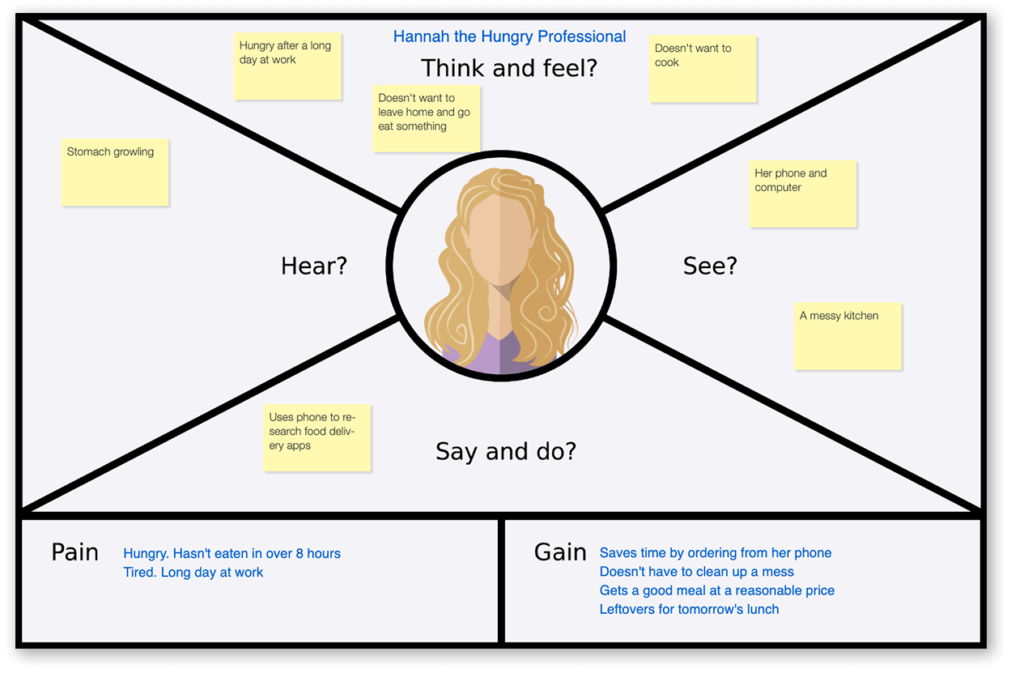
Think and feel has three cards: hungry after a long day, doesn’t want to go out, doesn’t want to cook. Those three together are the whole problem. Hannah has plenty of options for food. What she’s out of is energy.
Hear has one card, and it’s her stomach. That’s a real answer, and a funny one, but it’s also a sign. Hear is the hardest area to fill when you haven’t talked to anyone. On a map built from interviews, this is where you’d find the coworker who recommended an app, or the roommate who complains about the dishes.
See has her phone and computer, and a messy kitchen. The messy kitchen is doing a lot of work. It explains why she won’t cook better than anything in Think and Feel does.
Say and do has one card: she uses her phone to research delivery apps. That’s the moment a product team cares about, and it’s the thinnest area on the map. If this were our map, that’s where the next interview would go.
Gain is the richest area, and the last card is the best one on the board: leftovers for tomorrow’s lunch. Nobody would put that in a feature list. It’s also a reason to order a bigger meal, and a delivery app that knew about it might build something for it.
Here’s Hannah again, rebuilt in today’s CardBoard. Same person, same dinner problem, different cards.
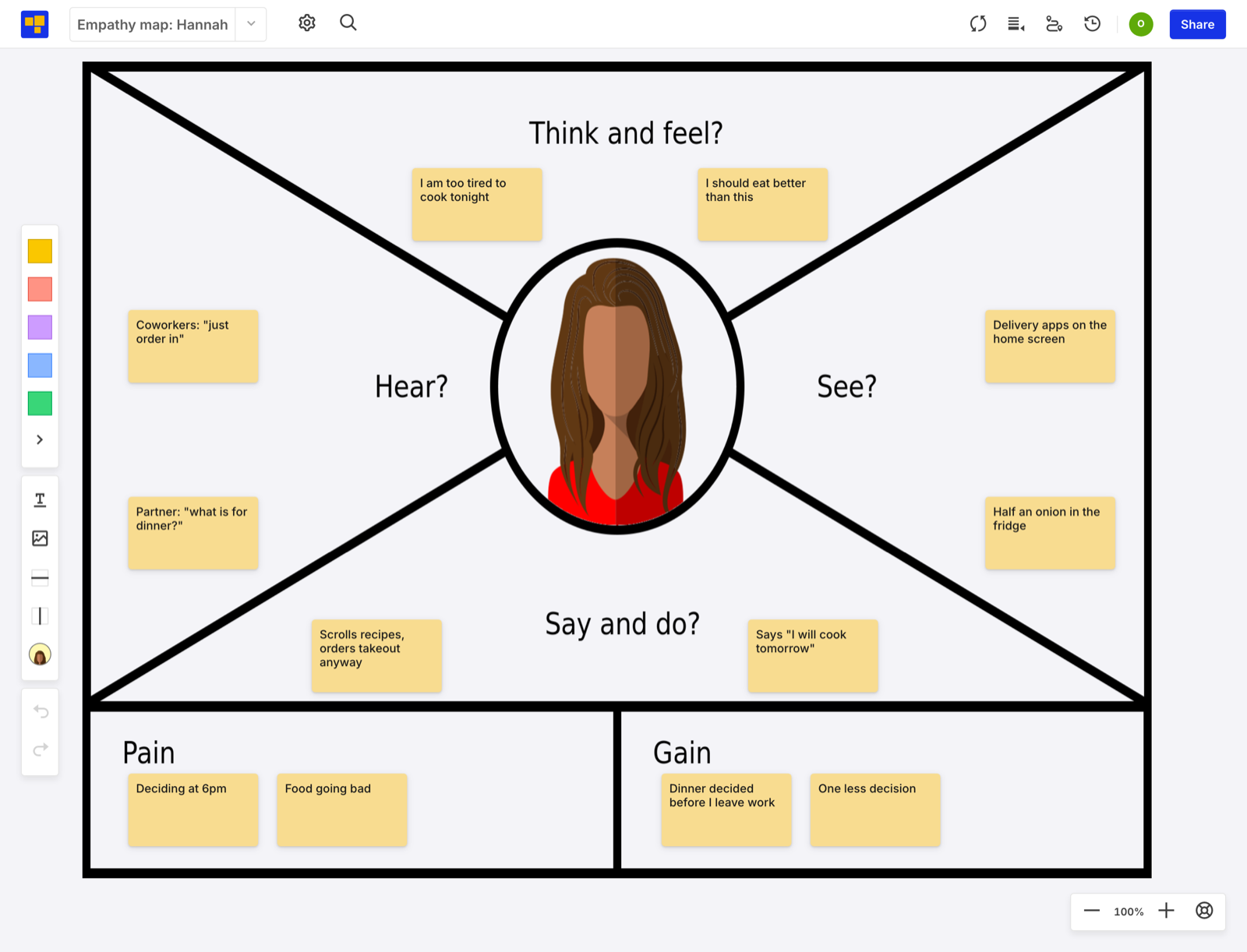
Hear is fixed. Her coworkers say “just order in,” and her partner wants to know what’s for dinner. Those are two people pushing her in two directions, which is a lot more useful than digestion.
The best pair is in Say and do. She says “I will cook tomorrow.” She scrolls recipes and orders takeout anyway. When what someone says and what they do disagree, believe the doing, and build for the gap.
When to use an empathy map
Whenever the team needs to stand in the customer’s shoes before deciding something. In particular:
- Filling in customer segments. On a Business Model Canvas or the Users and Customers section of an Opportunity Canvas, an empathy map turns a segment name into a person.
- Fleshing out a persona. A persona says who someone is. An empathy map says what their day is like.
- Before a user story map. A user story map starts with a user doing things. Knowing what they think and feel while doing them makes for a better backbone.
- After a round of interviews. Sorting notes into the areas shows which ones you covered and which ones you guessed.
Empathy maps in CardBoard
The Empathy Map is one of CardBoard’s templates, in the UX research and design group alongside Persona and Customer Interview Timeline. Create one and you get the XPLANE layout: Think and Feel, Hear, See, Say and Do, Pain, and Gain, with an avatar in the middle.
The avatar picker is in the board’s toolbar. Choose the face that best fits the customer you’re describing, and it replaces the one in the center of the map. Then drag cards into each area and talk through every one. The board keeps the result, so the next time someone says “our users want,” there’s a page to check.
I do a lot of my own market research with AI now, and what I find goes onto boards like this one.
Ready to meet your own Hannah? Create a free account. Three boards, no credit card.
Didn’t find what you need? Visit our Help Center to find answers or get in touch with our team.