How to use the Opportunity Canvas for a feature idea
There’s a comment in CardBoard’s source code, right above the layout for the Business Model Canvas. It says the nine blocks sit on “the same 10×9 sheet as the Opportunity Canvas.”
Which is true. When we laid both canvases out on a grid, they came out the same shape. Five columns across the top, a band along the bottom, a couple of columns split in half. You could trace one over the other.
Jeff Patton, who made the Opportunity Canvas, saw this coming. His own write-up addresses it almost immediately: “Yes, this looks like the business model canvas. But it’s not.”
He’s right, and the difference is the whole reason to use it. The Business Model Canvas is for a whole business, usually a new one. The Opportunity Canvas is for one feature idea on a product that already exists and already makes money. Same grid, different question. The Business Model Canvas asks whether a business can work. The Opportunity Canvas asks whether this one thing is worth building.
That second question is the one product teams face every week. Someone has an idea. Sometimes it came from a customer. Sometimes it came from the CEO, which tends to shorten the discussion. The canvas gives everyone the same ten boxes to argue in, before anyone starts estimating.
What the canvas is, and who it’s from
Patton is the author of User Story Mapping. The Opportunity Canvas sits upstream of the story map. The map is how you build the thing in slices. The canvas is how you decide there’s a thing worth building.
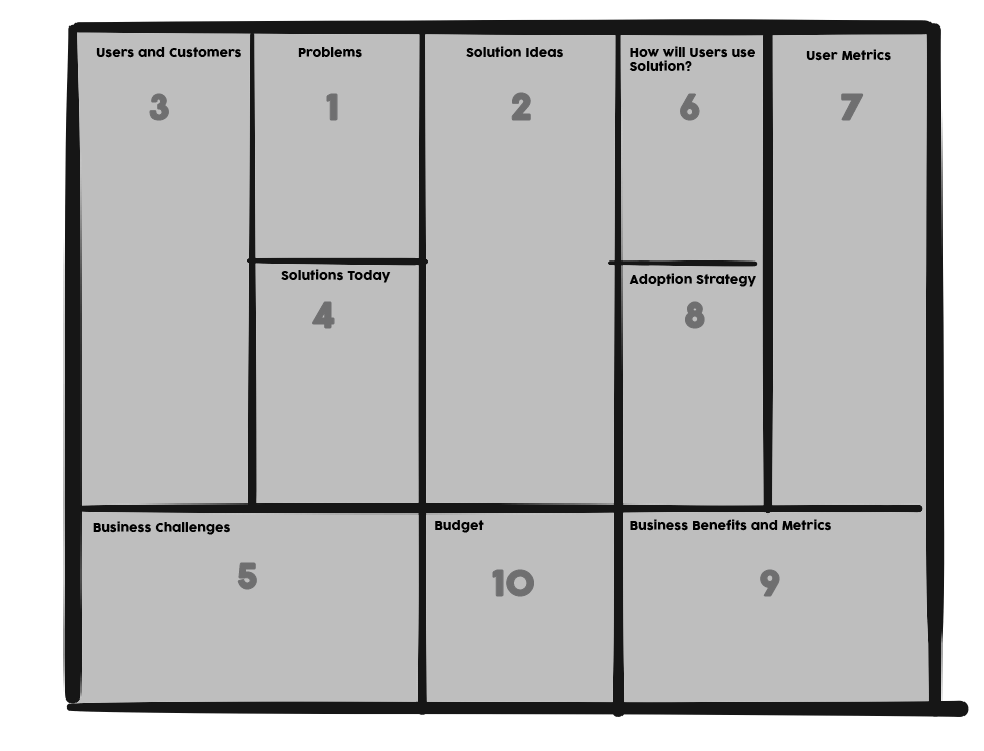
It’s one page with ten sections. They cover the users and their problems, the solution and how people will actually use it, how you’ll measure it, and what it’s worth to the business. When CardBoard started offering diagram types beyond story maps in 2018, this was one of the first.
Problem first, or solution first
The printed canvas numbers Problems as 1 and Solution Ideas as 2. That’s the order most product advice would give you: understand the problem, then solve it.
Patton’s current write-up starts on the other side. He begins with the solution idea and works backward to the problem it’s supposed to solve, then forward to the value it’s supposed to create.
There’s a practical reason. Nobody walks into the room with a problem statement. They walk in with a solution, fully formed, sometimes with a mockup. Starting there gets it on the canvas where everyone can see it. Then the next question writes itself: what problem does this solve, and for whom? That’s where the assumptions hiding inside the idea come out.
So here’s the judgment call. If the team is looking at a problem nobody has solved yet, follow the numbers and start at Problems. If someone has already shown up with the answer, which is most of the time, start at Solution Ideas and work backward. You’ll fill the same ten boxes either way.
Build your Opportunity Canvas in ten steps
These follow the numbers on the canvas above. Swap the first two if you’re starting from a solution.
- Problems. What problems do your users face that this solution addresses? What job is the user trying to get done?
- Solution Ideas. What feature or change solves those problems for these users? Describe it plainly. Save the tagline for later.
- Users and Customers. Which kinds of users and customers have these problems? Look for differences in their goals that would change how they use the solution. Split them into types, and accept that you can’t target everyone.
- Solutions Today. How do users deal with the problem right now? List the competitors and the workarounds. There is always a spreadsheet.
- Business Challenges. How do these user problems hurt your business? Lower retention, lost deals, support load? If you don’t solve it, what’s at risk?
- How will Users use Solution? Once a user has the solution, what do they do differently, and how does that help them?
- User Metrics. How will you measure usage and value from the user’s side?
- Adoption Strategy. How will people who don’t know about the solution find it? How will people who do know start using it?
- Business Benefits and Metrics. How will you measure the impact on the business: revenue, retention, cost, whatever the business actually tracks?
- Budget. How much is this worth spending, given what you now think it’s worth?
That last one deserves a second look, because it’s the step teams most often get wrong. Our 2018 version of this post treated Budget as an estimate of what building the solution would cost. Patton frames it the other way. At this stage you don’t know enough about the solution to estimate it. You do know roughly what it’s worth. So the budget is a ceiling, set by what the idea is worth. The estimate comes later and has to fit under it.
Six tips for a stronger Opportunity Canvas

- Keep the first pass short. The original version of this post said one hour, max. Patton suggests 15 to 30 minutes, and he’s the one who made it. A canvas that takes all afternoon has become the planning it was supposed to shorten.
- Don’t make it pretty. It’s a framing tool. Get the ideas onto the page in one place and worry about how it looks never.
- Start from whichever end you’re holding, problem or solution. You need both by the end, with a clear line between them.
- Be specific about users. “Users” isn’t a segment. “Account admins at companies with more than one workspace” is. The better you understand the user, the better you understand what you’re about to build.
- Keep business problems and user problems apart. A user’s problem is what they struggle with. The business problem is what that struggle costs you. The canvas gives them separate boxes, which helps.
- Guess when you don’t know, and say it’s a guess. A guess is an assumption with better manners. Write it down so it can be tested, and don’t make the big decision on it.
Then take it to a story map
A finished canvas answers whether the idea is worth building. It doesn’t tell you what to build first. That’s the next tool, and it’s the one Patton is best known for: a user story map, where the solution becomes a sequence of user steps you can cut into releases. The canvas’s User Metrics and Budget boxes are what tell you where to draw the first cut.
The Opportunity Canvas in CardBoard
When you create an Opportunity Canvas board in CardBoard, the ten sections are already laid out with their names, and the numbers from the printed canvas ride along on the board so the fill order is right there. Every card belongs to exactly one section. The sections are the lines, so there’s no line tool to draw over them.
The story map lives in the same workspace, on the same kind of canvas, so the move from “worth building” to “build this first” doesn’t involve exporting anything. And if you work with an AI agent connected to CardBoard over MCP, it can create an Opportunity Canvas board and propose cards into specific sections. They appear as suggestions until someone on the team accepts them.
Here’s one filled in, for a made-up feature: a 4pm reminder in a weeknight recipe app, with one recipe that uses what you already have. The numbered stickers are still on it.
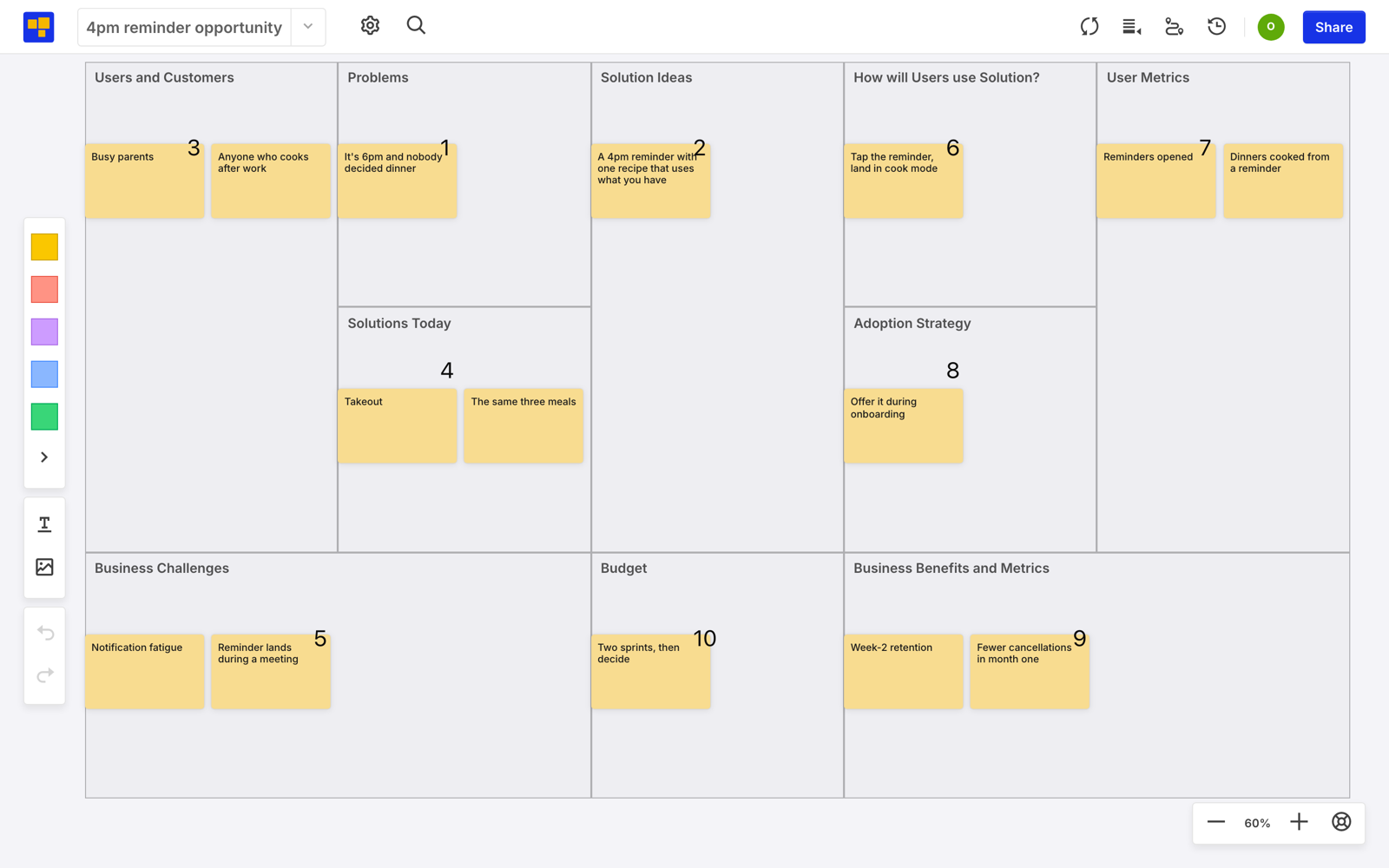
Look at Business Challenges. Both cards, notification fatigue and a reminder that lands in the middle of a meeting, are problems the solution itself would create. The canvas is good at surfacing that kind of thing before anyone builds it. And under Solutions Today, next to takeout, sits “The same three meals.” That’s the competitor to beat.
Think an Opportunity Canvas would help with the next idea someone brings you? Create a free account. Three boards, no credit card.
Didn’t find what you need? Visit our Help Center to find answers or get in touch with our team.