The best user story mapping tools, and how to choose
Updated
Story mapping tools are apps that lay a backlog out along the user's journey: the steps run across the top, the stories sit beneath each step, and horizontal slices mark the releases. The best one depends on where your team plans and tracks its work. CardBoard, StoriesOnBoard, Avion and Miro are all worth a look, but they serve different needs.
| Tool | Best for | Avoid if |
|---|---|---|
| CardBoard | Best for: Teams that want a tidy story map, synced to their tracker, with free guests See how CardBoard's user story mapping tool works → | Avoid if: You need handwriting or a 500-person room |
| StoriesOnBoard | Best for: Teams that want a dedicated, full-featured story mapping app CardBoard vs StoriesOnBoard, row by row → | Avoid if: You want a freeform canvas or free guests who can edit |
| Avion | Best for: A focused story mapper at one flat price, with unlimited users | Avoid if: You need AI or tracker sync on the entry plan |
| Miro | Best for: Big workshops of every kind CardBoard vs Miro for story mapping → | Avoid if: You need structure to hold across a large map |
| Aha! Roadmaps | Best for: Teams already planning their roadmap in Aha! | Avoid if: You want free editors or a layout that isn't tied to epics |
| Mural | Best for: Facilitated workshops CardBoard vs Mural for story mapping → | Avoid if: You want a structured story map |
| FigJam | Best for: Teams already working in Figma CardBoard vs FigJam for story mapping → | Avoid if: You need a structured map or free editors |
| Lucidspark | Best for: Whiteboarding with strong Jira and Azure DevOps sync | Avoid if: You want a structured map the tracker won't rearrange |
| Easy Agile TeamRhythm | Best for: Teams that never leave Jira CardBoard vs Easy Agile, row by row → | Avoid if: You want to control the layout, not Jira |
| Jira on its own | Best for: Managing the backlog, not mapping it | Avoid if: You want to see the whole journey |
What is story mapping?
Read the story mapping guideWe're not neutral. CardBoard publishes this page. We've tried to be fair about where other tools win, and to show our reasoning so you can check it. Every claim about another product comes from that product's own docs as of September 2026.
How to choose user story mapping software
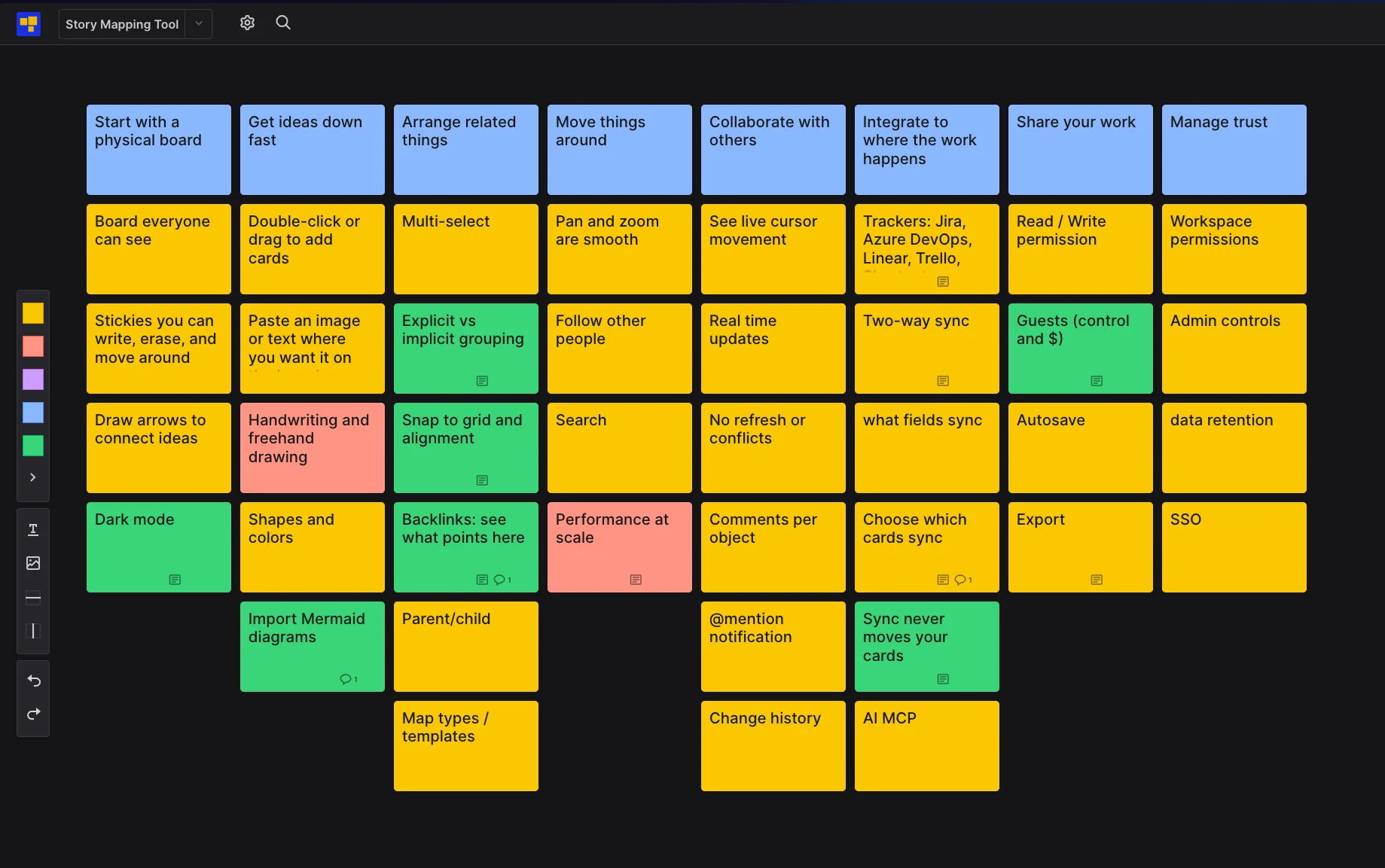
To choose a user story mapping tool, test it against the eight things a story map has to do:
- Feel like a wall
- Take ideas fast
- Keep them arranged
- Let you move around
- Let people work together
- Reach your tracker
- Share safely
- Pass a security review
Then pick the tool that's best at the ones you need most, and check what it gave up to get there.
Start from the wall
A story map started as sticky notes on a wall, and a good tool should still feel like one. Everyone can see the whole board. You can write a card, erase it and move it without opening a menu. You can draw an arrow between two ideas.
Every tool here clears that bar. Where they split is comfort for long sessions. CardBoard has a full dark theme and dark board backgrounds. Miro (on web and desktop), Mural, FigJam and Lucidspark don't have dark mode; Miro's request has been its most-voted idea since 2020, with more than 2,400 votes. Whimsical, Jira, Easy Agile, Avion and Aha! do have one. How we built ours.
Two-minute test: add, edit, move and erase a card, then draw one arrow. If any of it sends you hunting through a toolbar, the tool fails the wall.
Get ideas down fast
The first ten minutes of a mapping session are a flood. Double-click or drag to add a card. Paste an image or a list of text where you want it. Change a card's color or shape to mark what it is.
CardBoard can also start from Mermaid. Paste a Mermaid journey diagram, or have your AI agent send one, and you get a user story map. Flowcharts and mindmaps become process maps and mind maps. Either way you get real cards laid out by the map type, not a drawing. Miro, Whimsical and Lucidchart import Mermaid as diagrams made of shapes, and the dedicated story mappers don't import it at all. Two limits: it creates a new board rather than adding to an existing one, and it doesn't export back to Mermaid.
What we chose not to do: handwriting. Miro, Mural, FigJam, Lucidspark and Whimsical all have a pen. CardBoard doesn't, and neither do StoriesOnBoard, Avion or Easy Agile. A story map is words on cards, and every tool we add is one more thing a first-time guest has to figure out. If your workshops run on sketches, pick a whiteboard.
Two-minute test: add ten cards as fast as you can think of them, then paste an image where you want it. Count the clicks.
Arrange related things
This is where story mapping tools differ most, and where most of them quietly make you do the work. Every tool lets you select several cards and move them together, and most let you nest cards under a parent. The difference is the grid underneath.
Think of a notebook with dots versus one with lines. Dots help you line things up by eye. Lines make everything line up. Miro, Mural, FigJam and Whimsical are dot grids: cards snap to nearby points, and a story map there is an arrangement you maintain by hand. CardBoard's story maps are lined, like a spreadsheet. Insert a column in the middle and every card to its right shifts over. Freeze the header row so the backbone stays in view. Draw a horizontal line and it becomes a release slice, a real object with a name.
StoriesOnBoard, Avion and Aha! Roadmaps are lined grids too, and Avion keeps its backbone visible while you scroll. Against them, CardBoard's difference is that the grid sits on a canvas: you can still drop an image, a text note or a connector anywhere, and use the same tool for more than twenty other map types, from opportunity solution trees to process maps.
The second difference is grouping without moving. In most tools, a group is a place: a frame, a section, an area. Put a card in the box and it's in the group. CardBoard lets you select cards anywhere on the map, press Enter and name the set. Nothing moves. That's how you mark several paths through the same map (checkout for a new customer, checkout for a returning one) without copying cards or breaking the layout, an idea we took from David Hussman. Miro, Mural and FigJam can group objects without moving them, but the group has no name and locks the cards into one unit. StoriesOnBoard and Avion have tags and filters, but no saved group. Aha! goes the other way: on its story map, position is membership, so dragging a feature out from under an epic unassigns it.
Maps also know what points at them. Link to a map, or to a card on it, from another board, and the map's outline shows a "Referenced by" list, the way Notion and Obsidian do. Among the tools here, only Whimsical does the same. Miro, Mural, FigJam and StoriesOnBoard document links out, not links back.
Two-minute test: insert a column in the middle of a story map. Does everything to its right move over, or do you drag each card by hand? Then pick three cards in different places and make them a named group without moving them.
Move around the map
Pan and zoom should be smooth. You should be able to follow a teammate's view and find a card by title. CardBoard does all three on one map. It doesn't search across all your boards yet; Miro, Whimsical and StoriesOnBoard do.
What we chose not to do: the 500-person room. CardBoard is built for teams: many maps of dozens of cards, with a two-pizza team in each. We haven't tested it with hundreds of people moving thousands of cards at once, so we won't claim it. The whiteboards publish their limits. FigJam allows 500 people in a file with 200 editing. Mural switches to a crowd mode at 500 and locks at 1,000. Miro's largest session has been 377 people. If your event is that big, use one of them.
Two-minute test: open a map with a couple hundred cards, search for one by title, then follow a teammate's view.
Collaborate with others
This is table stakes now, so here's the checklist:
- Live cursors and real-time updates, with no refresh and no lost edits
- Comments on each card, with @mentions that notify
- Change history
The whiteboards, StoriesOnBoard and CardBoard all have live collaboration and comments; Avion and Easy Agile don't document live cursors. The bigger gap is history. Miro (paid plans), FigJam, Whimsical and StoriesOnBoard can show or restore earlier versions. CardBoard shows an activity feed for each board and card but can't restore a past version. Mural can't either.
Two-minute test: have two people edit the same card at once. Do you see each other? Does anyone need to refresh? Is one edit lost?
Integrate with where the work happens
A story map that doesn't reach your tracker is a screenshot the day after the workshop. Two-way sync used to set tools apart. Now most do it: Miro syncs Jira, Azure DevOps, Linear and Trello. Mural syncs Jira, Azure DevOps and Linear when you press a sync button. Lucidspark syncs Jira and Azure DevOps, and Aha! adds Rally. StoriesOnBoard and Avion sync with the major trackers. Easy Agile is Jira.
So the checklist is: which trackers, which fields, and can you choose which cards sync? CardBoard syncs with Jira, Azure DevOps, Linear, Trello and Shortcut on paid plans, and you choose card by card. With Jira and Azure DevOps, title and description sync both ways. Check the fields you care about in any tool before you commit.
The difference is what sync does to your map. In CardBoard, a change in Jira updates a card's text, never where it sits. Your map's layout is yours. Tools built closer to the backlog let the tracker decide. Easy Agile puts Jira epics across the top, ordered by board rank. StoriesOnBoard and Avion can map their top rows to Jira epics, so the tracker's hierarchy places your cards. In Lucidspark's Jira tables, a card's place follows its fields: change the sprint and the card moves. That's how a map built on the backlog starts to feel like "you do it this way here."
Couple the card to the data. Decouple the position.
The same goes for AI. Miro, Mural, FigJam, Lucid, StoriesOnBoard, Aha! and CardBoard all have MCP servers that let an agent like Claude read and change a board. What differs is what the agent reads. Miro hands it the board as SVG, shapes and coordinates it has to interpret. StoriesOnBoard hands it records: goals, steps, stories. CardBoard hands it the map's meaning: put "Reset password" in slice 1 and SSO below the line, and the agent knows what ships now and what's out of scope. Card details are stored as native Markdown, the format AI already reads and writes, so nothing gets lost in translation. And the agent's card edits arrive as proposals that a teammate accepts. Every other tool here with an MCP server, from Miro and Mural to StoriesOnBoard, Lucid and Aha!, lets the agent write straight to the board.
Two-minute test: sync one story, then move it on the map. Did anything change in the tracker? Then edit its title in the tracker and check the map.
Share your work
The checklist: set who can view and who can edit, save automatically, and export when you need a file. CardBoard exports CSV and PDF on paid plans; Miro exports on every plan, at small sizes on Free.
Most sessions have drivers and passengers. CardBoard charges for the drivers, the people who create boards, invite others and sync to a tracker. Guests are always free, on every plan, and they can edit the board, so a stakeholder can join a session without anyone buying a seat. Compare:
- Miro: guests are free, but they can only edit on Business plans and up. The Free plan has no guests.
- Mural: guests are Business-plan only. Share-link visitors are free but view-only on Free.
- FigJam: free seats can view and comment. Editing needs a paid seat or a 24-hour open session.
- Lucidspark: guests who can edit without an account need a Team plan or above.
- StoriesOnBoard: free viewers can comment, not edit.
- Aha! Roadmaps: every editor needs a paid seat; free reviewers on Enterprise can't edit the story map.
- Easy Agile: priced per Jira user, for every user on your Jira site.
- Avion: a flat monthly price with unlimited users.
- Whimsical: matches us, with free guests who can edit on every plan.
Two-minute test: invite a stakeholder. What does it cost you, and what can they change?
Manage trust
If your security team is involved, this is a checklist, not an argument. Here's where each control sits in CardBoard:
| Control | CardBoard plan |
|---|---|
| Two-factor sign-in, and a setting to require it | Every plan |
| Workspace audit log, with CSV export | Team keeps 90 days, Enterprise keeps everything (the last week on Free and Pro) |
| SAML single sign-on | Enterprise |
| Retention policies and legal hold | Enterprise |
For comparison: Miro and Mural put single sign-on on Business and up, FigJam on Organization, StoriesOnBoard on Pro, and Avion and Lucid on Enterprise. Mural keeps its audit log for Enterprise and FigJam for Organization; CardBoard includes it on Team, with 90 days of history. Avion gives every user two-factor sign-in, and so do we. Retention controls are an Enterprise feature or add-on across Miro, Mural and FigJam, as they are here.
The tradeoffs
Every tool on this page picked a side of three tradeoffs. Knowing which side you're on matters more than any feature list.
Freedom or structure. An infinite canvas lets you add anything, but the board doesn't know what anything means. Working with AI there means showing it a picture of the map and hoping it reads your intent. Structure means position, type and proximity carry meaning, so you can do more with the map: sync it, analyze it, reorganize it, hand it to an agent. The cost is that it can feel restrictive the moment someone wants to color outside the lines.
Simple or complex. Every feature raises the learning curve. That's fine for a power user who wants every knob. Most people in a mapping session are there for the work, not the tool, and simple means less friction to take part.
A chart with two axes. Left to right runs from complex to simple; top to bottom runs from structured to freeform. Complex and structured: Jira, Aha! Roadmaps, StoriesOnBoard and Easy Agile. Simple and structured: Avion and CardBoard, with CardBoard the simpler of the two and closer to the middle. Complex and freeform: Miro, Mural and Lucidspark. Simple and freeform: Confluence whiteboards and FigJam.
Pay per person or pay for capacity. Miro, Mural, FigJam, Lucidspark, StoriesOnBoard and Aha! charge per editor. Avion charges a flat price and caps your story maps. CardBoard charges for the people who drive and caps boards on the free plan. Match the model to how many people you need in the room. CardBoard pricing.
At a glance
| Tool | Story map | Tracker sync | Guests | Agents |
|---|---|---|---|---|
| CardBoard | Lined grid on a canvas | Jira, Azure DevOps, Linear, Trello, Shortcut (paid plans) | Free on every plan, can edit | MCP; card edits arrive as proposals |
| Miro | Story map widget with releases | Jira, Azure DevOps, Linear, Trello | Free; edit on Business and up | MCP; reads the board as SVG |
| Mural | Sticky-note template | Jira, Azure DevOps, Linear (manual) | Business and up | MCP (preview, paid plans) |
| FigJam | Sticky-note template | Jira widget | Free seats view and comment | Via Figma's MCP server |
| Lucidspark | Sticky-note template | Jira, Azure DevOps (per card or JQL) | Guest editing on Team and up | MCP; writes directly |
| StoriesOnBoard | Lined grid | Jira, Azure DevOps, Trello, GitHub | Free viewers comment | MCP; writes directly |
| Avion | Lined grid | Jira, Azure DevOps, Linear, Trello, GitHub (Business and up) | Unlimited users, flat price | None found |
| Aha! Roadmaps | Native grid over Aha! records | Jira, Azure DevOps, Rally, Trello, GitHub | Every editor pays; free reviewers can't edit the map | MCP; writes directly |
| Easy Agile TeamRhythm | Jira epics across the top | It is Jira | Every Jira user pays | AI for retros, not the map |
Frequently asked questions
- What's the best user story mapping tool for engineering managers?
- The best one is the one your team uses without being told to. If your team never leaves Jira, Easy Agile TeamRhythm keeps the map inside it. If you want a map that doesn't add process, CardBoard syncs card by card with Jira, Azure DevOps, Linear, Trello and Shortcut, and a tracker change updates a card's text, never where it sits. Guests are free and can edit, so no one buys a seat to join a session. Test it: sync one story, move it, and check whether the tracker changed.
- What's the best user story mapping tool for product managers?
- The best one gets stakeholders to agreement fastest. If your roadmap already lives in Aha!, its story map is built on those records. For large workshops, Miro. If you want a map people work on instead of a deck they watch, CardBoard lets stakeholders join free and edit the map with you. Start from a Mermaid journey or have your AI agent draft one. The same tool also handles opportunity solution trees and process maps, so you switch tools less often.
- Is Miro good for user story mapping?
- Yes, for workshops. Miro has a built-in story map widget with activity, task and story rows and release slices, and its Jira cards sync both ways. The limits show on bigger maps: cards inside the story map can't be grouped or locked, and task-row cards can't become Jira issues. It has no dark mode on web or desktop.
- Does Jira do user story mapping?
- Not on its own. Jira and Jira Product Discovery have no story map view. Atlassian's option is a User Story Map template on Confluence whiteboards, where sticky notes can become Jira work items. Most teams add a Marketplace app like Easy Agile TeamRhythm or a dedicated tool that syncs with Jira.
- Can AI build a user story map?
- Yes. Miro, Mural, Lucid, StoriesOnBoard, Aha! and CardBoard all have MCP servers that let an agent like Claude add cards to a board. The difference is what the agent understands. On a whiteboard it reads shapes. In CardBoard, position carries the meaning, and the agent's card changes arrive as proposals you accept.
- Is there free user story mapping software?
- Yes. CardBoard's free plan includes three boards, and guests are always free and can edit. Syncing with Jira, Azure DevOps, Linear, Trello or Shortcut needs a paid plan, from $10 a month. Miro, Mural, FigJam and Lucidspark also have free plans with board or file limits. StoriesOnBoard, Avion and Aha! offer trials only.