How to fill in a Business Model Canvas, block by block
In 2004, Alexander Osterwalder finished a PhD at the University of Lausanne. His thesis was called The Business Model Ontology. It is not the kind of title that ends up on a poster.
It ended up on a poster anyway. Six years later he and Yves Pigneur published Business Model Generation, a book that lists 470 co-creators from 45 countries. All of that work compresses to one page with nine boxes on it. That page is the Business Model Canvas, and it’s probably the only doctoral research you’ve seen taped to a conference room wall.
The nine boxes are the point. They force a business idea into the same nine questions every time, so the gaps show. You can’t hand-wave the revenue model when there’s an empty box labeled Revenue Streams staring at the room.
Which is why it matters what the boxes are called. The first version of this post, from 2018, renamed four of them. “Customer Segments” became “Audience Segments.” “Customer Relationships” became “Audience Relationships.” That’s a small edit with a big cost. An audience watches. A customer pays. The whole canvas is organized around the second one. We’ve put the real names back.
Nine blocks, two halves
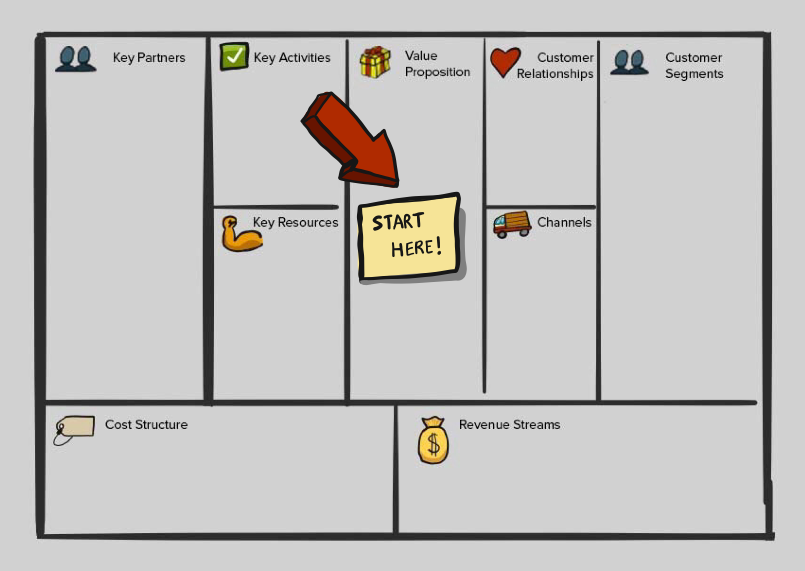
The canvas has a shape, and the shape is an argument. The right side is about value: who you serve, what you give them, how you reach them, what they pay. The left side is about efficiency: the activities, resources, and partners it takes to deliver that value. Cost Structure and Revenue Streams sit along the bottom, one under each half, where they can see each other.
Osterwalder’s book frames it the same way, value on the right and efficiency on the left. Read the canvas from right to left and it tells you a story about customers. Read it from left to right and it tells you a story about operations. A good canvas tells the same story both directions.
Give it an hour and a handful of people
These rules shipped with the first version of this post. None of them are Osterwalder’s, and they’ve held up better than the block names did.
Set aside one uninterrupted hour, in a room or on a board with no other work in it. A first pass is a sketch. Give a team three hours and they’ll spend two of them wordsmithing the Value Propositions block.
Bring a few people. You want someone who talks to customers and someone who knows what things cost. Past five or six, the canvas turns into a meeting about the canvas.
Describe the business you’re planning. It’s easy to fill in the future with the past, and the canvas will happily let you. If different departments or product lines run on different models, give each its own canvas. Cramming two onto one page hides both.
When you don’t know, guess, and mark the guess. A guess on a card is something the team can test. A blank box is just a blank box.
Then do your competitor’s canvas. Knowing your own business model is the job. Knowing theirs is how you notice where yours is ordinary.
Start with Value Propositions, or with Customer Segments
Our old sketch has a big red arrow pointing at the Value Propositions block and a note that says “Start here.” It was a reasonable call. Most teams arrive with a product in mind, and the fastest way to get it out of their heads is to let them write it down first.
It isn’t the book’s call, though. Business Model Generation walks the blocks starting from Customer Segments and goes around the right side before crossing to the left.
Here’s a better rule. If the room is arguing about what the product is, start with Value Propositions and let them get it out. If the room is arguing about who it’s for, start with Customer Segments. Either way, those two blocks get filled first, and they get filled together. A value proposition with no segment attached is a slogan.
After that, go around the right side, then the left. Connect blocks as you go. Every channel should reach a segment on the canvas. Every key activity should serve something on the right. A card that doesn’t connect to anything is either missing a partner or doesn’t belong.
The nine blocks, and what each one asks
These are the canvas’s own names, in the order the book walks them.
Customer Segments
Which groups are you creating value for? Who is your most important customer? If there’s more than one segment, give each one its own card color and use that color for every card that serves it. You’ll see in about thirty seconds which segment the business is actually built around.
For help filling this block with more than demographics, an empathy map is the companion tool. Business Model Generation includes one for exactly this job.
Value Propositions
What need are you satisfying? What problem are you solving? What bundle of products and services are you offering each segment? Write one card per segment, not one for the company.
Channels
Through which channels do your customers want to be reached? How are you reaching them now? Which channels work best, and which are cheapest?
Customer Relationships
What kind of relationship does each segment expect you to establish and maintain? Personal help, self-service, community, automated? What does each one cost, and how does it fit the rest of the model?
Revenue Streams
For what value are your customers really willing to pay? What do they pay for now, and how? How would they prefer to pay? How much does each revenue stream contribute to the total?
Key Resources
What key resources do your value propositions require? Count the physical ones, and also the people, the money, and the intellectual property.
Key Activities
What key activities do your value propositions require? Which ones does the rest of the canvas depend on most?
Key Partners
Who are your key partners and suppliers? Which key resources come from them? Which key activities do they perform? What’s in it for them?
Cost Structure
What are the most important costs in the model? Which key resources and key activities are the most expensive? Is the business trying to be cheap, or trying to be worth it?
Once it’s full, go looking for what’s missing
A full canvas feels finished. It isn’t. It’s a first draft of a business, and it has holes. You just can’t see them yet because every box has something in it.
So show it to people who weren’t in the room. Ask the questions the canvas makes easy to skip:
- Can this model scale? If so, which block breaks first?
- How much money do you need before revenue shows up?
- Are you spending the budget before you’ve earned it?
- How much of the work should happen in house, and how much belongs to a partner?
Every answer is a card, and most of them move something.
If one block turns out to hide a whole product decision inside it, that’s the point where the Business Model Canvas has done its job and a smaller canvas takes over. Jeff Patton’s Opportunity Canvas is built for one feature on one existing product, which is usually where the argument moves next.
The Business Model Canvas in CardBoard
When you create a Business Model Canvas board in CardBoard, the nine blocks are already laid out, with the names Strategyzer uses. Each block is a region of the board, and every card belongs to exactly one block. There’s no line tool on this board. The blocks already are the lines, and a hand-drawn one would only argue with them.
Cards come in the same colors as every other CardBoard board, so the one-color-per-segment trick works without setup. And if you work with an AI agent connected to CardBoard over MCP, it can create a Business Model Canvas board and propose cards into a named block. The proposals show up on the board as suggestions, and a person decides which ones stay.
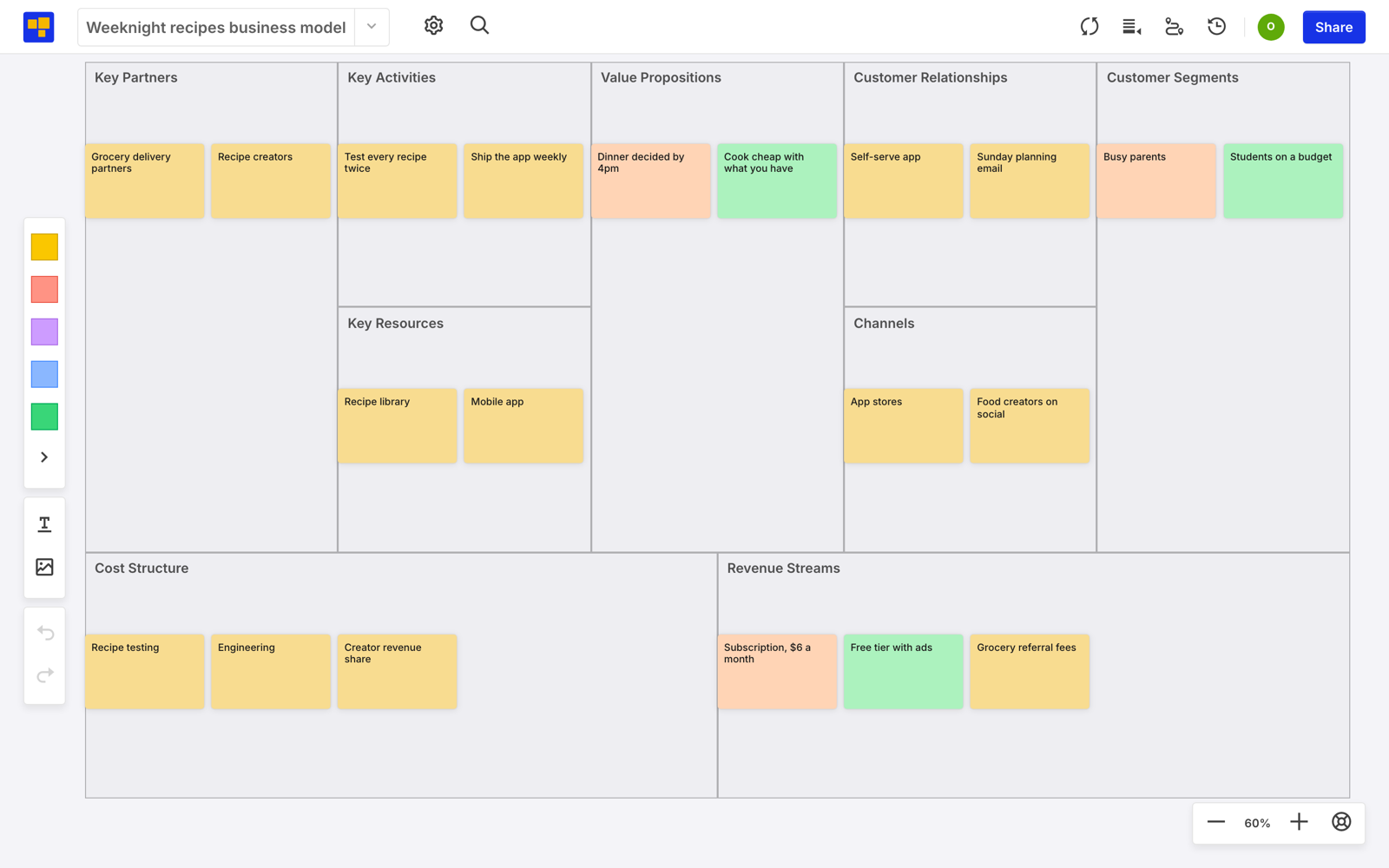
Here’s one filled in, for a made-up weeknight recipe app with two segments: busy parents in orange, students on a budget in green. Most of the canvas stays yellow, because most of the business serves both. The colored cards are where the segments split.
Want to try it on your next idea? Create a free account. Three boards, no credit card. A Business Model Canvas only needs one.
Didn’t find what you need? Visit our Help Center to find answers or get in touch with our team.