The difference between a product backlog and a user story
Open the Scrum Guide and search it for “user story.” You’ll get zero results.
The 2020 edition defines the Product Backlog in one line: “an emergent, ordered list of what is needed to improve the product.” It says who’s accountable for it and how it gets refined. It does not say what the items on it should look like. That part it leaves to you.
Most teams fill it with user stories anyway, which is how two ideas from two different places ended up used as if they were one. The backlog comes from Scrum. The user story comes from Extreme Programming, where Kent Beck’s team started writing them on index cards in 1997.
They fit together well. They are not the same thing. The difference matters most at the exact moment one gets poured into the other.
What is a user story?
A user story is a short description of a capability, told from the point of view of the person who wants it. It’s a statement of intent, focused on the value to the user rather than the mechanics of the feature.
The usual format:
As a [type of user], I want [to do something], so that [a benefit].
An example from a B2B product. Say you’re building online invoicing for small businesses:
As a business owner, I want to generate invoices online, so that I can bill my clients quickly and accurately.
Who: the business owner. What: generate invoices online. Why: bill clients quickly and accurately.
The product owner usually writes and prioritizes stories, but the people building them shape them too. They refine the details and catch what the story forgot to say. For the full walk-through, from blank card to acceptance criteria, see how to write agile user stories.
What is a product backlog?
A product backlog is the single ordered list of everything that might be done to improve a product, from features to fixes. The Scrum Guide calls it “the single source of work undertaken by the Scrum Team.”
The Product Owner is accountable for it. They decide what’s on it and in what order, and they keep it honest as the product and the market change. The Developers help refine it, breaking big items down and sizing them.
It’s a planning tool. It answers one question very well: what should we work on next?
The difference, in one sentence
A user story is one item. A product backlog is the ordered list those items live on.
The backlog can hold user stories, but also bugs, spikes, and anything else the team has agreed to do. A story can exist without a backlog, on a card or a wall. A backlog without stories is still a backlog. It’s just harder to tell who it’s for.
| User story | Product backlog | |
|---|---|---|
| What it is | A single item describing what a user wants and why | An ordered list of all the work on a product |
| Where it came from | Extreme Programming, late 1990s | Scrum |
| Who owns it | Usually written by the Product Owner, shaped with the team | The Product Owner is accountable |
| What it answers | Who wants this, and why? | What do we do next? |
| Granularity | One capability | The whole product |
If the backlog is a book, stories are sentences in it. Each makes sense on its own. Read them in the wrong order and the plot gets hard to follow.
What gets lost when stories become a list
Here’s the moment that matters. A team spends a morning working out what a new customer does, in order. Sign up, set up the account, send the first invoice, get paid. Then they write the stories, rank them, and load them into the backlog.
Every story makes it across. The order doesn’t.
Jeff Patton, who wrote the book on story mapping, compares it to picking every leaf off a tree, bagging them, and cutting the tree down. His essay on it is worth ten minutes. What’s left is a bag of perfectly good leaves and no way to tell which branch they came from.
The first thing that goes is the gaps. A step every user takes that nobody wrote a story for is obvious when the steps are laid out in order, and invisible in a list of two hundred ranked items.
Then prioritization gets local. Ranking item 14 against item 15 is easy. Seeing that items 3, 19, and 40 are three steps of the same flow, and that shipping two of them strands the user, is not.
And the people building it lose the why. A developer picking up a story out of context has to guess what it’s for. Different people guess differently. That’s how a team ships something that meets every acceptance criterion and still doesn’t work for the user.
Map the stories before you rank them
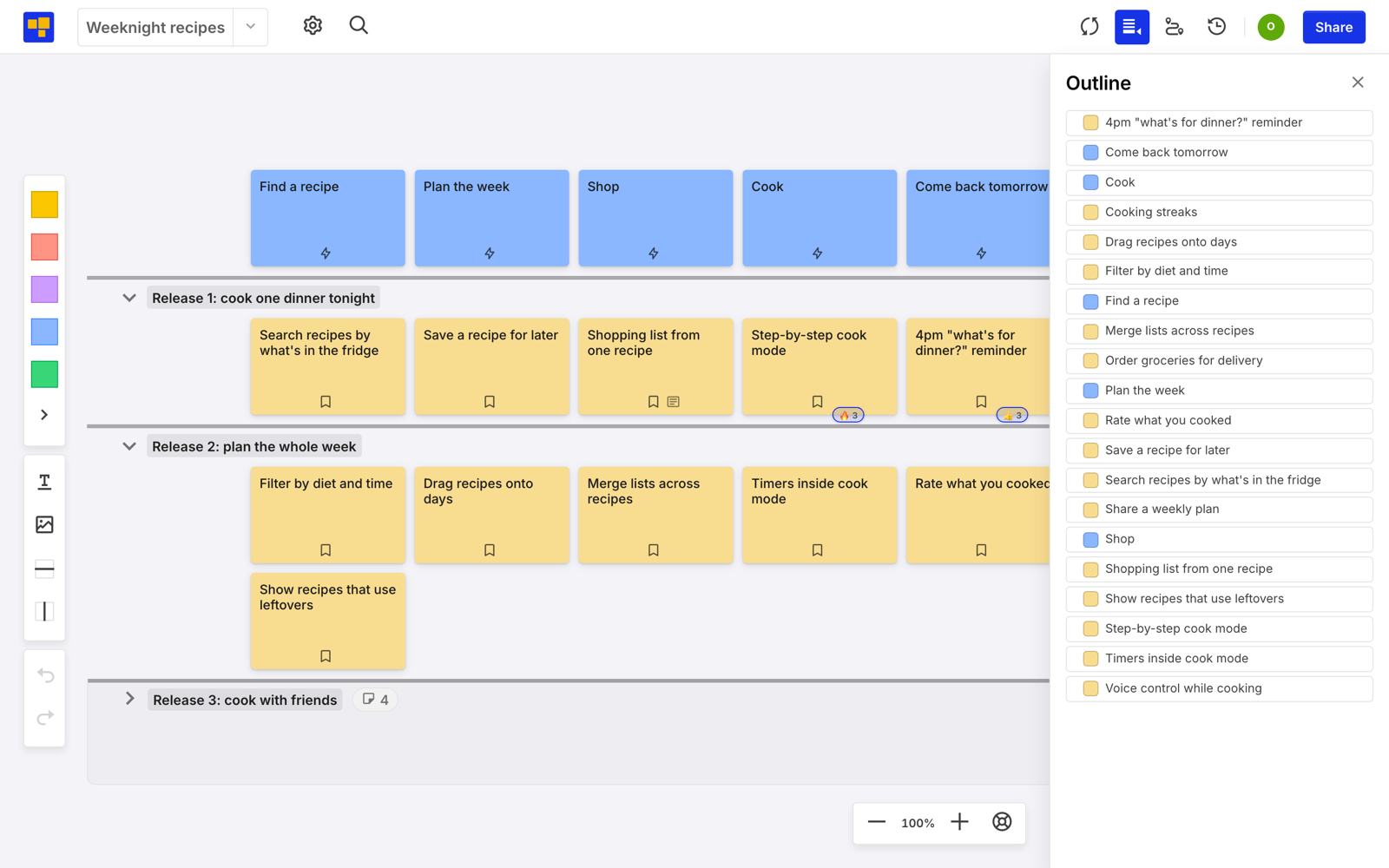
User story mapping keeps the order and the stories in the same picture. The user’s steps run left to right across the top. Stories hang beneath the step they belong to, most important at the top. Horizontal slices cut across the map to show what ships together.
Gaps show up as blank space under a step. Prioritization happens by drawing a line, and the line has to make sense as something a user can do start to finish. And each story still sits under the reason it exists. The complete user story mapping guide walks through building one.
The backlog still has a job, downstream of the map. The map is where you decide what to build. The backlog is where you track building it.
That’s how CardBoard is set up. You build the map on a story map board and slice it into releases with dividers. Then you connect the board to Jira or Azure DevOps. Linked cards keep their title, status, description, and acceptance criteria in sync with the work items in both directions. The backlog gets the stories in the order your tracker wants. The map keeps the order the user lives in. For how to run the backlog side day to day, see backlog management with a user story map.
CardBoard can show you both views of the same board. Open the Outline panel and the map’s cards turn into a flat list.
Start free. Three boards, no credit card.
Frequently asked questions
Is a user story the same as a product backlog item?
No. A user story is one kind of product backlog item. The backlog can also hold bugs, technical tasks, spikes, and other work.
Does Scrum require user stories?
No. The Scrum Guide doesn’t mention user stories. It requires a Product Backlog but leaves the format of its items to the team. User stories come from Extreme Programming and are the most common format Scrum teams choose.
Who owns the product backlog?
The Product Owner is accountable for the Product Backlog: its contents, its order, and keeping it transparent. The Developers help refine it.
Who writes user stories?
Usually the Product Owner, together with the team. The best stories are written in conversation with the people who will build them and, ideally, the people who will use them.
What is the difference between a product backlog and a sprint backlog?
The product backlog holds everything that might be done to the product. The sprint backlog is the subset the Developers have selected for the current sprint, plus their plan for delivering it.