How to write agile user stories, with examples
In 1997, Kent Beck’s team on the Chrysler C3 payroll project started writing requirements on index cards and calling them stories. The cards were small on purpose. You could fit a sentence, maybe two, and then you had to go talk to someone.
Four years later, an XP team at a London company called Connextra gave the sentence a shape: As a [type of user], I want [some goal] so that [some reason]. The same year, Ron Jeffries described a story as three things, a Card, a Conversation, and a Confirmation.
That template is now twenty-five years old. It has outlived the index card, most of the tools that first stored it, and the C3 project itself. It is also, reliably, the part teams get wrong, because it looks like a form you fill in. It was supposed to be a reason to stop writing.
Below is how to write one step by step, with the judgment calls left in. Then comes the thing the template can’t do on its own, which is show where a story sits in the path a user takes through the product.
The card that never had its conversation
I have my own story about this. We wanted to improve CardBoard’s canvas, and a library looked like the way to do it. Specced out, it was great. Every feature on the list checked out.
Then we put it in, and it was much slower than the custom canvas we already had.
Nothing in the request was wrong. What was missing was a sentence nobody wrote down: how fast does panning a big board have to feel? That’s the conversation the card was supposed to start, and we didn’t have it until the library was already in. We scrapped the library and moved our old CoffeeScript to modern Hotwire on Rails instead.
The missing piece was an acceptance criterion. Performance was part of “done” the whole time. It just wasn’t on the card.
What is an agile user story?
A user story is a short description of something a user wants, told from that user’s point of view. It names who wants it, what they want to do, and why. It is deliberately incomplete. The details arrive later, in conversation.
The common template:
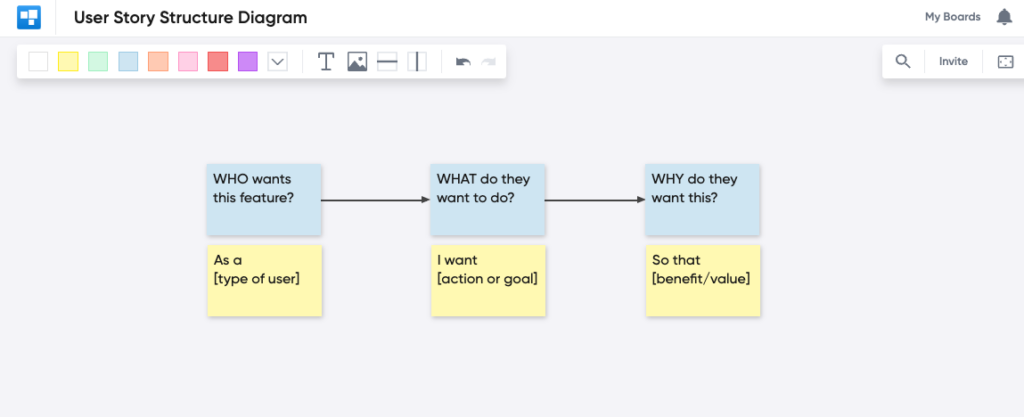
As a [type of user], I want [an action] so that [a benefit or value].
User stories started in Extreme Programming, not Scrum. The Scrum Guide never mentions them. Most Scrum teams use them anyway, as the most common kind of item on the product backlog.
The 3 C’s of a user story
Ron Jeffries’ 2001 formula of Card, Conversation, and Confirmation is still the best short description of how a story works.
The card is the story written on a card, or on something as small as one. It doesn’t hold the details. It’s a reminder that a conversation has to happen.
The conversation is where the details come from: people talking, ideally including someone who actually has the problem. It’s where the team finds out whether they all pictured the same thing.
The confirmation is the acceptance criteria, how everyone will know the story is done and working as intended.
Most story trouble is a team doing the first C, skipping the second, and arguing about the third at the sprint review.
Who, what, and why
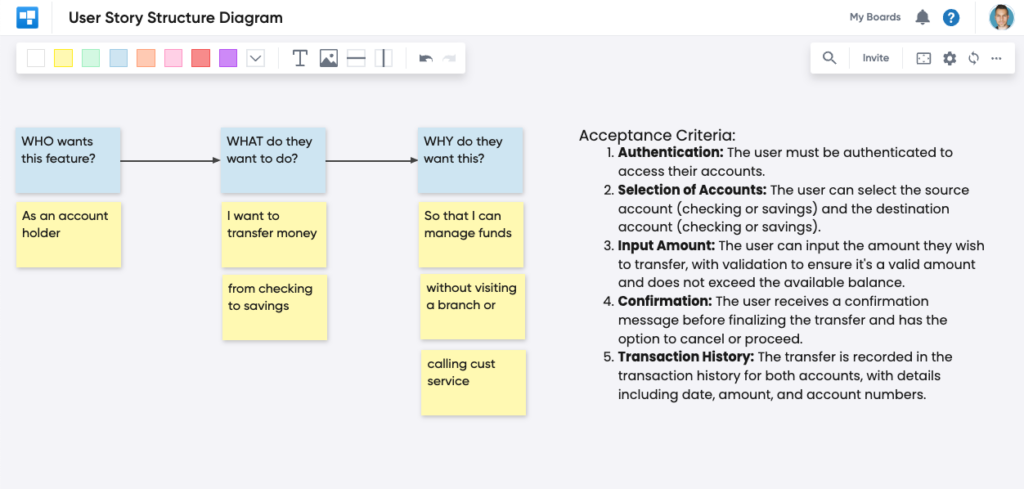
Every story names a user (a new customer, an admin), the thing they want to do, and the benefit they get from doing it. The why is the part that gets dropped first and missed last.
A user story example
As a frequent flyer, I want to check in online for my flight, so that I can save time at the airport.
The frequent flyer is the user. Checking in online is the capability. Saving time at the airport is the benefit.
Notice that the benefit is doing real work. If the reason were “so that I can pick my seat,” you’d build a different thing: seat maps first, boarding pass later. Same who, same what, different product.
How to write a user story, step by step
Here’s how I’d walk a single story from blank card to ready. The running example is the frequent flyer.
1. Start with a specific user. “As a user” is a placeholder that escaped. Name the kind of person, and pick the one whose problem you’re actually solving. A frequent flyer and a family of five flying once a year want different things from online check-in.
2. Write the what in their words, not yours. “I want to check in online,” not “I want a check-in microservice.” If a sentence mentions an endpoint or a database table, it’s a task wearing a story costume.
3. Make the why falsifiable. “So that I can save time at the airport” can be checked after launch. Did people who checked in online skip the counter? “So that I have a better experience” can’t be checked, so it can’t be wrong, so it isn’t helping.
4. Have the conversation before you write the criteria. Put the card in front of the people who will build it and ask what’s unclear. Does “check in” include bags? Does it include people on the same booking? The answers become the criteria, and some of them become new stories.
5. Write acceptance criteria as observable behavior. “The traveler can check in from 24 hours before departure” is testable. “Check-in works” is a wish. Keep them specific, and get everyone who’ll build or test the story to agree on them.
6. Size it, then split it. If the story won’t fit in one sprint, or the criteria run long enough to need a scroll bar, split it. Split by path through the product (online check-in for one traveler, then for a whole booking) rather than by layer (the database part, then the UI part). A layer is not something a user can do.
Check it against INVEST
Bill Wake’s INVEST checklist, from 2003, is the fastest sanity check for a finished story. A good story is:
- Independent. It can be built and shipped without waiting on another story.
- Negotiable. The details are still open to conversation.
- Valuable. A user or customer would notice it shipped.
- Estimable. The team knows enough to size it.
- Small. It fits comfortably in a sprint.
- Testable. The acceptance criteria can pass or fail.
A story that fails two of these usually needs splitting. A story that fails all six is a project.
Habits that keep stories honest
Write stories with the team, not for them. Shared authorship is most of what makes the conversation happen. Revisit them as you learn, because a story is allowed to change right up until someone starts building it. And put the non-functional requirements, like performance and accessibility, into the criteria, or they’ll show up later as bugs with better lawyers.
Where user stories go wrong
The story is really an epic. “As a traveler, I want to manage my trip” is a product, not a story. It’s hard to estimate and harder to finish. Split it until each piece is something a user can do on its own.
The user disappears. Teams under deadline start writing stories about the system: “As the API, I want to validate the token.” The user was the point. Put them back.
Vague acceptance criteria. If the criteria can be read two ways, they will be, usually by the two people who most need to agree. Make them specific enough to fail.
Non-functional requirements go missing. Stories describe what the system should do. How fast and how secure it should be tends to live nowhere, which means it lives in production.
A story on its own doesn’t know where it lives
There’s one more problem, and the template can’t fix it.
A discovery team maps out how a user gets from signing up to checking out. They hand it to a delivery team trained in user stories. The delivery team rewrites everything into the template and loads it into a backlog, ranked. Each story is fine. The order the user does them in is gone.
Now nobody can tell that stories 3, 19, and 40 are three steps of the same checkout, or that shipping two of them strands the user halfway. Teams often respond by adding process, another refinement meeting, another handoff document. That usually pulls discovery and delivery further apart.
The fix is to keep the stories somewhere that shows that order.
Put the stories on a user story map
A user story map lays out what the user does, left to right, as a backbone of activities. Stories hang beneath the step they belong to, most important at the top. Horizontal slices cut across the map to mark what ships together.
Every story now has two coordinates: where it happens in the user’s flow, and which release it’s in. A backlog can hold only one of those.
In CardBoard, that’s what a story map board is. Each story is a card. The title is a short name, the description holds the story sentence and what came out of the conversation, and acceptance criteria have their own field on the card. Release slices are dividers: drop one across the map and the cards above it are the release. When the map is ready, connect the board to Jira or Azure DevOps and the cards link to work items, with title, status, description, and acceptance criteria syncing both ways. The backlog gets its stories. The map keeps the order they happen in.
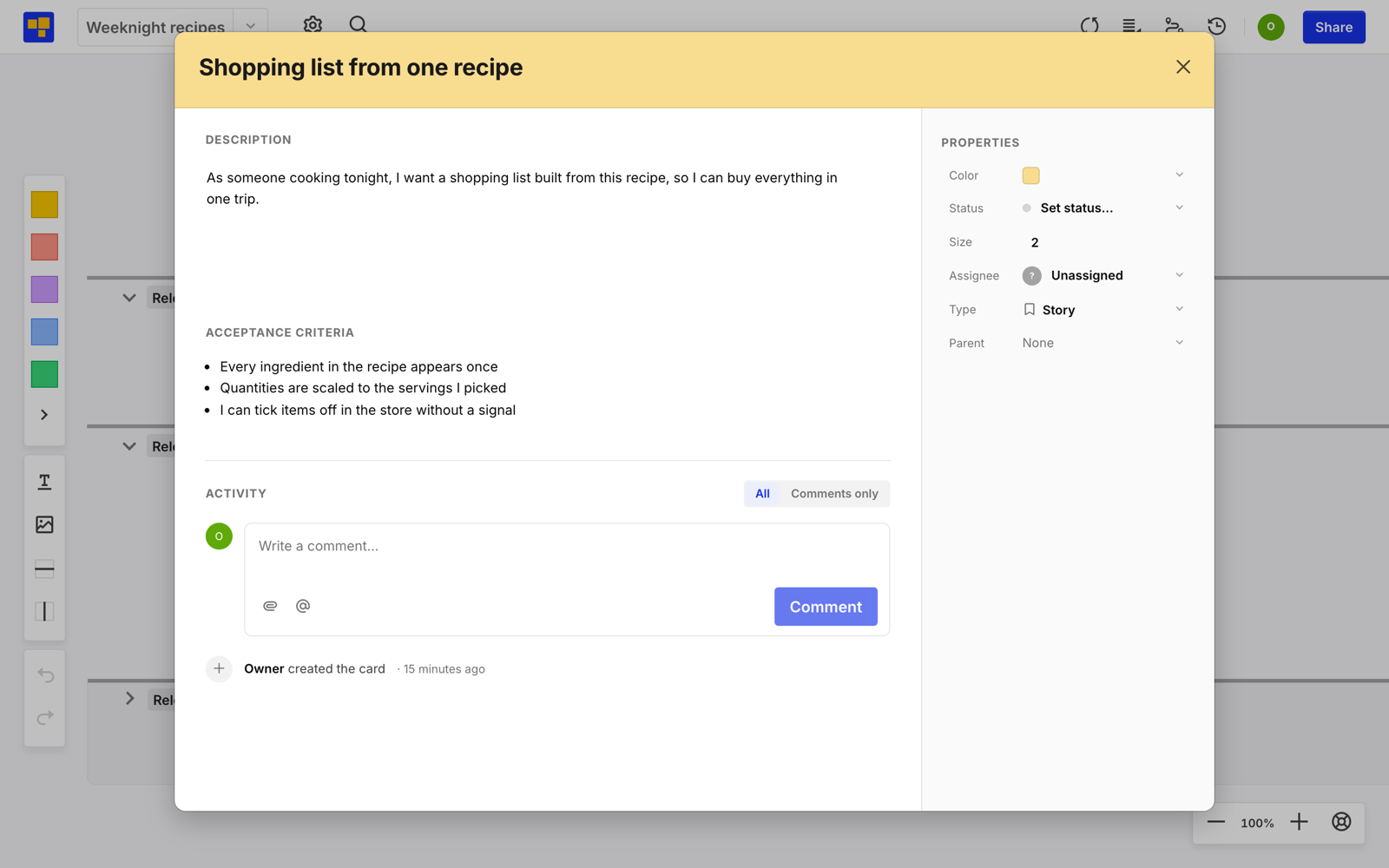
A card was always meant to be a promise of a conversation. A map is where you can see which conversations you haven’t had yet.
If you’re running the mapping session yourself, facilitating one well is its own skill. Start free, three boards, no credit card.
Frequently asked questions
What is a user story in Scrum?
Scrum doesn’t define user stories; the Scrum Guide never mentions them. But most Scrum teams use them as items on the Product Backlog. A user story is a short description of a capability from the perspective of the person who wants it, usually in the form “As a [type of user], I want [an action] so that [a benefit].” Stories help a Scrum Team break a large product into pieces small enough to build in a sprint.
What are the 3 C’s of a user story?
Card, Conversation, and Confirmation, a formula Ron Jeffries proposed in 2001. The card is a short written reminder, the conversation is where the details come from, and the confirmation is the acceptance criteria that show the story is done.
How detailed should a user story be?
Detailed enough that the team understands who wants it and why, and not so detailed that there’s nothing left to discuss. The goal is shared understanding, not a specification.
How do I know if a user story is too large?
If it can’t be finished within one sprint, or the acceptance criteria are hard to state briefly, it’s too large. Split it by path through the user’s flow rather than by technical layer.
What is INVEST in agile?
A checklist for good user stories, from Bill Wake in 2003: Independent, Negotiable, Valuable, Estimable, Small, and Testable.
Can a user story change after it’s written?
Yes. Stories are meant to change as the team learns. Until someone starts building it, the Product Owner can rewrite or drop a story.
How does user story mapping fit into Scrum?
A story map arranges the Product Backlog’s stories along the steps a user takes, so the team can see how they fit together. It’s most useful during Backlog Refinement and Sprint Planning, and when deciding what goes in a release.
How does CardBoard help with user stories?
CardBoard is a user story mapping tool. Each story is a card with its own description and acceptance criteria, stories sit under the step they belong to, and dividers mark release slices. Boards connect to Jira or Azure DevOps, so linked cards stay in sync with the backlog.