Agile sprints: how to run one without burning out your team
In 2011, Ken Schwaber and Jeff Sutherland made a small edit to the Scrum Guide. The Development Team would no longer commit to the work it chose in sprint planning. It would forecast it.
One word. The usual explanation is that “commit” had been doing damage: a list of work picked on day one, treated as a promise by day ten, and used as evidence against them on day fourteen. “You committed to this” is a sentence nobody has ever said kindly.
The word “sprint” doesn’t help either. The Agile Manifesto asks for a pace that sponsors, developers, and users “should be able to maintain indefinitely.” Nobody sprints indefinitely. That’s called running, and eventually it’s called a doctor’s appointment.
So this is a guide to sprints as a pace you can keep. What a sprint is, what happens inside one, and the judgment calls that decide whether the team is still standing at the end of the tenth.
What a sprint is
A sprint is a fixed-length block of time, one month or less, in which a Scrum team turns part of the product backlog into a usable increment. Two weeks is a common choice. When one sprint ends, the next begins immediately.
Every sprint has a Sprint Goal: one sentence that says why this sprint is worth doing. The work the team picks is a forecast of how they’ll get there. The goal is the part they actually commit to. When the 2020 Scrum Guide brought the word “commitment” back, it attached it to the goal instead of the pile.
Sprints come from Scrum, and Scrum is one framework under the Agile umbrella. Kanban, for comparison, has no sprints at all. If you’re deciding between them, see how Kanban fits with Agile and Scrum. For the roles and artifacts around the sprint, see Why Scrum? A product owner’s guide.
The four events inside every sprint
A sprint contains four events. The Scrum Guide sets a maximum length for each, based on a one-month sprint. Shorter sprints usually get shorter events.
- Sprint Planning (up to 8 hours)
- Daily Scrum (15 minutes, every day)
- Sprint Review (up to 4 hours)
- Sprint Retrospective (up to 3 hours)
Here’s what each one is for, and where it tends to go wrong.
1. Sprint planning starts with the goal
Planning answers three questions, in this order: why is this sprint valuable, what can get done, and how will it get done.
The order matters. It is common for planning to start with the backlog and work backward to a goal that describes whatever got picked. That produces goals like “Complete stories 14 through 22,” which is a list wearing a hat.
Start with the goal instead. As product owner, bring a proposal: “By the end of this sprint, a new customer can sign up and create their first project without help.” Then the team pulls the backlog items that serve that goal, and only those.
Two judgment calls happen here.
Slicing. Each item needs to be small enough to finish inside the sprint and big enough to be worth something on its own. A user story map makes this easier, because you can see every step the user takes and cut a thin horizontal slice across all of them instead of finishing one column and leaving the rest.
Capacity. Plan from what the team has actually finished in recent sprints, minus holidays and on-call. Don’t plan from what they’d finish if nothing went wrong. Something always goes wrong. That’s the whole reason the word is “forecast.”
2. The Daily Scrum is about the goal
The Daily Scrum is for the Developers. It’s fifteen minutes, same time, same place, and its job is to check progress toward the Sprint Goal and adjust the plan for the next day.
It is not a status report to the product owner or the manager. If people are addressing their updates to one person, the meeting has become a status report, and that person should consider standing somewhere else.
A useful test: at the end, can anyone say whether the Sprint Goal is still on track? If not, the meeting talked about tasks instead of the goal.
3. The sprint review is a working session
At the end of the sprint, the team shows stakeholders what got done and talks about what to do next. The Scrum Guide is specific that this is a working session, not a presentation.
The output of a good review is a changed product backlog. Stakeholders react to the working increment, and the product owner reorders what’s next based on what was learned. If the backlog looks the same after the review as before, the review was a demo.
4. The retrospective protects the pace
The retrospective is where the team looks at how it worked, not what it built. What helped, what got in the way, and what to change next sprint.
Burnout shows up here first, if anyone is looking. The retro only works if people feel safe saying “we took on too much” out loud. Pick one or two concrete changes and put them in the next sprint’s plan, where they’ll actually happen.
If your retros have gone stale, try a new format. The 4Ls retrospective is a good one to start with.
When something urgent lands mid-sprint
This is the moment that decides whether sprints protect your team or just give it a deadline.
The Scrum Guide’s rule is simple. During the sprint, no changes are made that would endanger the Sprint Goal. Scope can be clarified and renegotiated with the product owner as the team learns more, but the goal holds.
In practice that gives you three options when something urgent arrives:
- If it fits inside the goal, take it. No drama.
- If it doesn’t fit but can wait, put it at the top of the backlog for next sprint. Most urgent things can wait ten days. They just don’t enjoy it.
- If it makes the goal pointless, the product owner can cancel the sprint. Only the product owner can, and only when the Sprint Goal has become obsolete. It’s rare, and it should be.
What you don’t do is quietly add it on top and keep the old forecast. That’s how two weeks of work becomes two weeks of work plus a weekend.
Habits that keep sprints sustainable
Write the Sprint Goal as an outcome. “Customers can export to CSV” beats “Build the export feature,” because it tells the team when they’re done.
Plan to about 80% of what the team has recently finished. The gap is where the interruptions go, and there will be interruptions.
Keep the length fixed. Stretching a sprint to fit the work removes the one thing the time-box is for, which is forcing a decision.
Make the review change something. If stakeholder feedback never moves the backlog, stop calling it feedback.
Carry one retro action into the next sprint’s plan, visibly. Five actions in a doc nobody reopens adds up to zero.
And watch the pace as well as the output. If the team hits every goal and people are working evenings to do it, the sprints are too full. The Manifesto said indefinitely.
Planning the next sprint from a story map
We plan our own work in CardBoard, on user story maps. The steps a user takes run across the top. The work sits underneath, and horizontal lines divide it into slices, one per release or sprint. Moving a card between slices is how scope gets negotiated, in front of everyone.
For sprint planning, that means the question “what goes in this sprint?” becomes “where does the next line go?” You can see which of the user’s steps the slice covers and which it leaves out, before anyone commits (sorry, forecasts) to it.
CardBoard is where the planning happens, not where the sprint is run. If your team works in Jira or Azure DevOps, link the cards in the slice to their work items. Title and status stay in step both ways, so by the sprint review the map shows what got done without anyone updating it by hand.
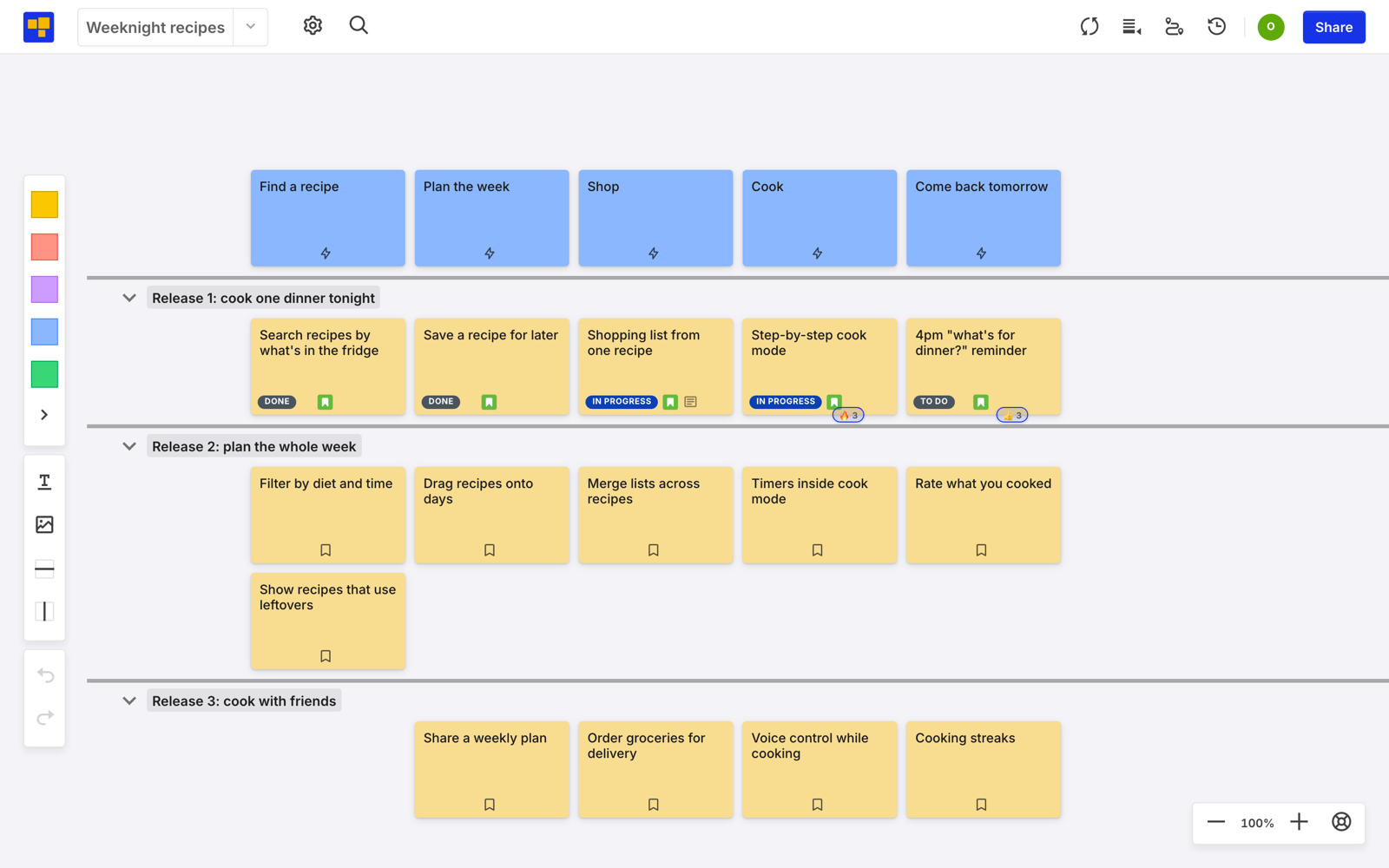
The line moves every sprint. That’s fine. It was a forecast.