Kanban vs Scrum: how Kanban fits with agile
The idea behind every Kanban board in software came from a grocery store.
In the late 1940s and 1950s, Taiichi Ohno was working out how Toyota could build cars without piles of parts stacked beside every station. The model he kept returning to, as he describes in Toyota Production System, was the American supermarket. A supermarket doesn’t guess how much milk you’ll want next Tuesday. You take a carton off the shelf, and that empty space is the signal to restock it.
Ohno turned the empty shelf into a card. A downstream station would pass a card back upstream, and the card said, in effect, “make one more of these.” No card, no work. The Japanese word for that kind of signboard is kanban.
Fifty years later, software teams borrowed the card, put it on whiteboards and then in browsers, and mostly forgot the part where no card means no work. That part turns out to be the important one.
Agile, Scrum, and Kanban in one paragraph each
People ask “Kanban or Scrum?” as if they were rival religions. They’re closer to two dialects of the same language.
Agile is the language. It’s the set of values and principles from the Agile Manifesto: working software, collaboration, responding to change. It tells you what to care about, not what meetings to hold.
Scrum is a framework under that umbrella, with fixed-length sprints, three accountabilities (Product Owner, Scrum Master, Developers), and a set of events that repeat every sprint. You plan a chunk of work, do it inside a time-box, review it, and start again. Why Scrum? covers it in depth.
Kanban is a way of managing work as it flows through a process, with no sprints at all. Work is pulled in when there’s capacity for it and moves across a board as it progresses. There are no prescribed roles and no fixed cadence.
A household version: Scrum is deciding on Saturday morning that the next four hours are for cleaning the house, then checking at noon what got done. Kanban is washing each dish right after you use it, and never letting more than three pile up in the sink.
Kanban vs Scrum at a glance
| Scrum | Kanban | |
|---|---|---|
| Cadence | Fixed-length sprints, one month or less | Continuous flow |
| Roles | Product Owner, Scrum Master, Developers | None required |
| How work is limited | By what fits in the sprint | By a WIP limit on each stage |
| When plans change | Usually between sprints | Any time a slot opens up |
| Key measure | Sprint Goal met | Cycle time, throughput |
| Board | Reset each sprint | Persists |
Neither column is the grown-up one. Scrum’s time-box is good at forcing decisions, while Kanban’s flow suits work that shows up on its own schedule, like support tickets or anything with “urgent” in the subject line.
From Toyota to the Kanban Method
Kanban came to software largely through David J. Anderson, whose 2010 book Kanban: Successful Evolutionary Change for Your Technology Business described how he applied pull systems to software teams. What he wrote down is usually called the Kanban Method.
It asks you to do three things:
- Visualize the work. Every piece of work is a card on a board. The board has a column for each stage of your process, like “To do,” “In progress,” and “Done,” and cards move right as the work moves forward. Anyone can see the state of everything at a glance.
- Limit work in progress. Each stage gets a maximum number of cards. When a column is full, nobody starts anything new there until something leaves. This is Ohno’s empty shelf.
- Manage the flow. Watch where cards pile up. A column that’s always full is a bottleneck, and the fix is usually upstream of it.
The second one is where most boards quietly fail. A board without WIP limits is a to-do list with extra steps. It will show you that twenty-two things are in progress. It will not stop the twenty-third.
The six core practices of Kanban
This list is often labeled “the six rules of Kanban.” Toyota did have six rules of its own, but they were about moving physical parts between stations, such as never passing a defective part downstream. The list software teams use comes from the Kanban Method, where they’re called core practices.
- Visualize the workflow. Make your real process visible on a board, including the stages people don’t like to admit exist, like “Waiting for review.” For a product owner, that might mean the whole path from idea to launch.
- Limit work in progress (WIP). Cap how many cards each stage can hold. For a product owner, that might mean no more than three features in development at once, even when stakeholders are asking for a fourth.
- Manage flow. Track how work moves through the stages and fix what slows it down. If cards sit in “Review” for a week, the review step is the problem to work on.
- Make process policies explicit. Write down the rules, especially what “done” means for each column. “Done” should not mean “I stopped looking at it.”
- Implement feedback loops. Hold regular reviews of the board, the flow, and the process itself. Kanban doesn’t prescribe which meetings, only that the loops exist.
- Improve collaboratively, evolve experimentally. Treat each change to the process as an experiment. Measure whether it helped. Keep it or roll it back.
The four foundational principles
The practices are what you do. The principles are the attitude you do them with. Kanban is unusual here, because its principles mostly tell you not to blow things up.
- Start with what you do now. Don’t redesign your process before you’ve looked at it. Put your current workflow on a board, exactly as it is, and change nothing else yet.
- Agree to pursue incremental, evolutionary change. Small adjustments, one at a time. Big reorganizations meet big resistance, and Kanban would rather not fight that battle.
- Respect the current process, roles, responsibilities, and titles. Kanban doesn’t ask anyone to give up their job title on day one. The goal is to improve what exists, not replace it.
- Encourage acts of leadership at all levels. Anyone on the team can spot a bottleneck and propose a fix. It doesn’t have to come from the product owner or the manager.
Principle 1 is the most practical advice in this whole post. The temptation is to start by drawing the process you wish you had. Draw the one you have. It’s more embarrassing and much more useful.
Scrum, Kanban, or both
You don’t have to pick. Plenty of teams run Scrum’s sprints and events and use a Kanban board, with WIP limits, to manage the work inside each sprint. Corey Ladas called this mix Scrumban, and Scrum.org publishes a Kanban Guide for Scrum Teams on how to combine the two.
A rough way to choose:
- Mostly planned work, a clear product goal, a team that benefits from a rhythm: start with Scrum.
- Mostly unplanned work that arrives on its own schedule: start with Kanban.
- Sprints that keep getting blown up by interruptions: add WIP limits and a flow board to your sprints before you abandon them.
Whichever you pick, the 4Ls retrospective works as the feedback loop.
Setting up a Kanban board in CardBoard
CardBoard has a Kanban map type. When you create a board, choose Simple Kanban Board, and you get a board whose columns are your workflow stages. Each card belongs to exactly one column. If you need rows too, for different teams or different kinds of work, choose Swimlane Kanban Board instead.
Here’s how I’d set it up, following principle 1:
- Rename the columns to match the stages your work actually goes through today, including the awkward ones.
- Add a card for every piece of work that’s currently in flight. All of it. This is usually the moment someone says “oh.”
- Decide a WIP limit for each column. CardBoard doesn’t enforce WIP limits for you, so put the number in the column name, like “Doing (WIP 3).” It’s a policy, and policies are supposed to be explicit anyway.
- If your team works in Jira or Azure DevOps, link the cards to their work items. Title and status stay in step both ways, so the board doesn’t drift from the tracker.
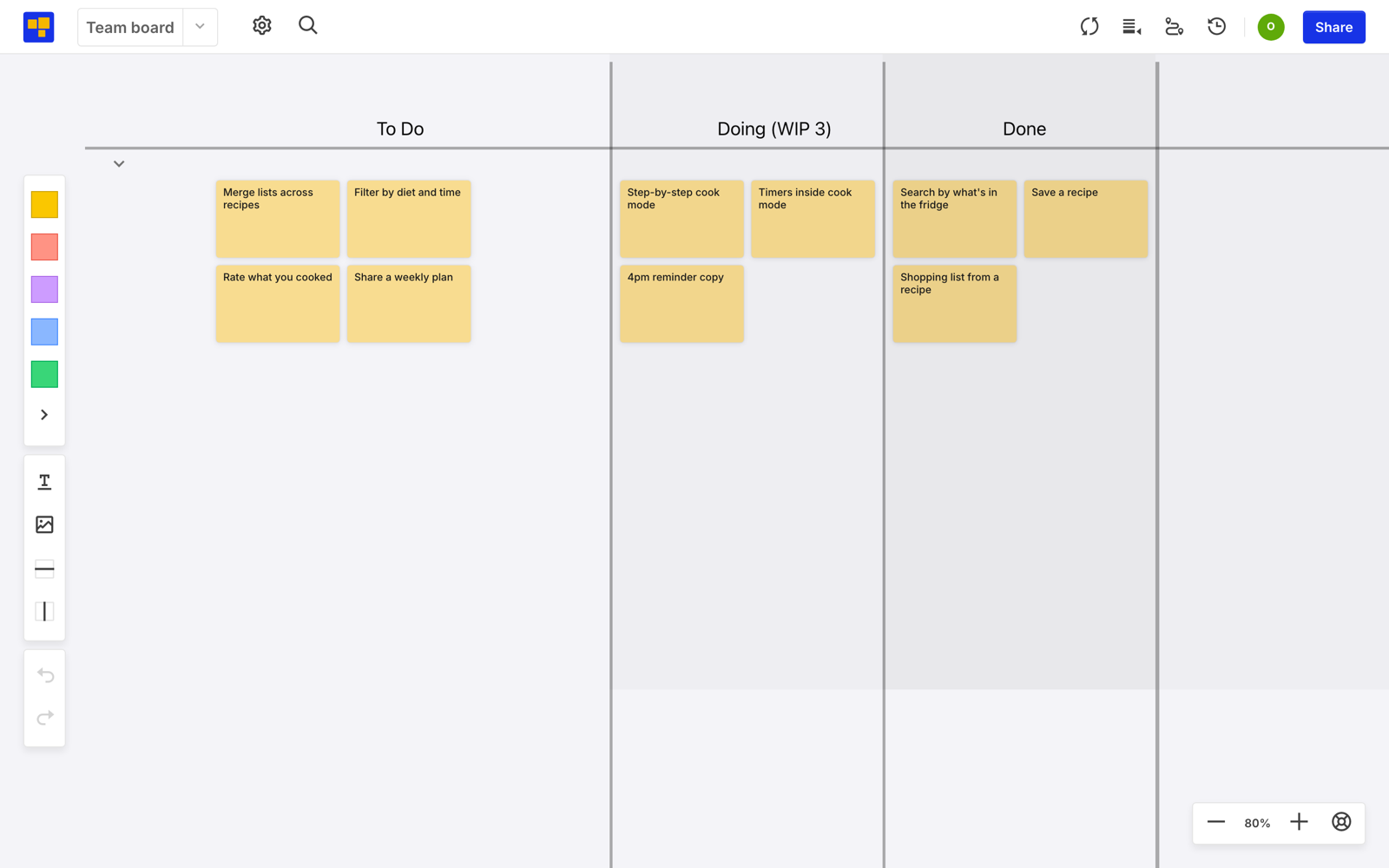
Then leave it alone for two weeks and watch which column fills up. That column is your first experiment.