How to facilitate a user story mapping session
New to story mapping? Start with our complete User Story Mapping Guide.
Forty minutes into a story mapping session, something predictable happens.
The room has written eight activities across the top of the wall. Someone reads them aloud, left to right, and halfway through it becomes clear that two of them are the same thing and one of them is a button. There’s a pause. Somebody laughs. The engineer who hasn’t said anything yet points out a step nobody wrote down.
That’s the session working. The first backbone is always wrong, and a map is cheap to change precisely so being wrong early costs a minute instead of a sprint. The facilitator’s job is to get the room to that moment quickly and keep it there long enough to fix what it finds. Then get everyone out with decisions instead of a nice picture.
Here’s how to run one, in the order a session actually goes.
1. Most of the work happens before anyone arrives
Decide what the session is for. Name the product or feature you’re mapping and the decisions you need by the end. “An agreed backbone and a first release slice” is a good outcome. “Alignment” is a mood.
Send a one-page brief 48 hours ahead with the objective and whatever background people need. The point is that nobody spends the first twenty minutes finding out why they’re there.
Invite five to eight people who are close to the user. A product manager brings the strategy and a designer brings the user’s perspective. A developer knows what’s hard. Someone from support has heard the real complaints, and someone from sales has heard the real objections. Favor people who know the user over people with the right title. If more stakeholders want in, run a second session, or give observers a scheduled slot to weigh in rather than a seat at the wall.
In person, you need a long wall and more sticky notes than seems reasonable. Remote, you need a shared board everyone can edit at once, and it helps if people have opened it before the session starts. Either way, set two ground rules up front: critique ideas, not people, and build on what’s there before replacing it.
2. The first ten minutes set the tone
Warm up with something on topic. The “unlikely user” prompt works well: describe the strangest way someone might use this product. It gets people writing, and it gets the obvious users out of the way early.
Then make it safe to be wrong. Say out loud that half of what goes on the wall will move. A mistake of your own that taught you something does more than any ground rule.
Explain the shape of a map, with activities across the top, stories underneath, and release slices across the whole thing. Then show the method, which is working alone together. Pose a question, give everyone two minutes of silent writing, then share.
Last, open a parking lot, a corner of the board for good ideas that don’t belong in this session. Putting something there is a promise to come back to it. Keep the promise, or people stop using the parking lot and start using the meeting.
3. Build the happy path before the backbone
Ask for the main steps of the ideal scenario before anyone names an activity. Steps are concrete. Activities are abstract, and people argue about abstractions longer. Have each person sketch five to seven steps (5 minutes), present them (1 minute each), then consolidate as a group.
Now read the row aloud, left to right, as a sentence. This is the moment from the top of this post. Duplicates and gaps show up at once, along with the step that belongs somewhere else. Fix them. It takes about a minute.
Then expand. Give people 10 minutes alone to add detailed steps, alternative paths, and pain points, 15 minutes to discuss as a group, and 10 more to refine. Use “yes, and” to build on ideas rather than critique them on arrival.
Once the steps are stable, cluster them into higher-level activities. A useful prompt is to zoom out. If you had thirty seconds to explain this to someone, which phases would you name?
4. Write stories as reminders of a conversation
Use the familiar format, “As a [user], I want [goal] so that [reason],” but treat each story as a reminder of a conversation. Ron Jeffries’ 3 C’s are the right frame. The card is a short written reminder, so resist cramming detail onto it. The conversation is where questions come up and assumptions get tested. The confirmation is shared, testable acceptance criteria: “User can log in with an email address,” not “authentication works.” For more on writing them, see how to write agile user stories.
Then walk the map left to right. Recap the goal and step through the backbone, reviewing the stories under each step and filling the gaps you find. Consider alternate flows and edge cases. Only then move to prioritization.
5. Draw the release line, then defend it
Start with a quick alignment check. Everyone silently picks their top three stories and shares them, and you note where the room already agrees. Then agree on criteria, usually user value, business value, complexity, and risk, on a simple 1 to 3 scale. Plotting stories on a user value versus effort grid makes the quick wins and the expensive surprises obvious.
Then draw the first release slice across the map. Everything above the line has to let a user get from the first step to the last. That constraint settles more arguments than any scoring model.
When people still disagree, ask for evidence first. What do we know, and how do we know it? Lightweight signals like dot voting or fist-to-five show where the room is. Asking about the underlying concern, five whys style, often turns a fight about a story into a fight about an assumption, which is a better fight to have. If it’s still stuck, defer to the named decision-maker, or park it for research.
6. Energy runs out before time does
Work in roughly 25-minute blocks with short breaks. Alternate solo writing, pairs, and full-group discussion so nobody spends an hour just listening. Build in movement, even remote. For anything over two hours, take a long break or split the session across two days. When people start debating button colors, it’s time for a break.
7. Leave with decisions in hand
A good ending is what makes the map worth the afternoon.
Name the top insights. What surprised the room, and which assumptions did it just test? Then record each decision with why it was made and what dissent was heard.
Assign next steps with an owner and a date. “Run five onboarding interviews by Friday,” not “do some research.”
Close by connecting the map to where the product is going, and put the follow-up on the calendar before anyone leaves the room, because a follow-up that gets scheduled later mostly gets scheduled never. Then thank people. They just spent an afternoon arguing with sticky notes.
Running it in CardBoard
Everything above works with sticky notes. A shared board helps with the parts sticky notes are bad at: remote people, cards that carry detail behind them, and a map that survives the cleaning crew.
In CardBoard, start a board with the user story map map type and share it before the session. Everyone can add and move cards at the same time. Release slices are dividers. Drag one across the map and name it for the outcome it delivers. The parking lot can be its own region of the board.
For the silent top-three exercise, use reactions. Everyone drops the same emoji on their picks, and the counts show on each card. Reactions are deliberately not a vote with a winner, which is what you want here. You’re looking for where the room agrees, not tallying a referendum.
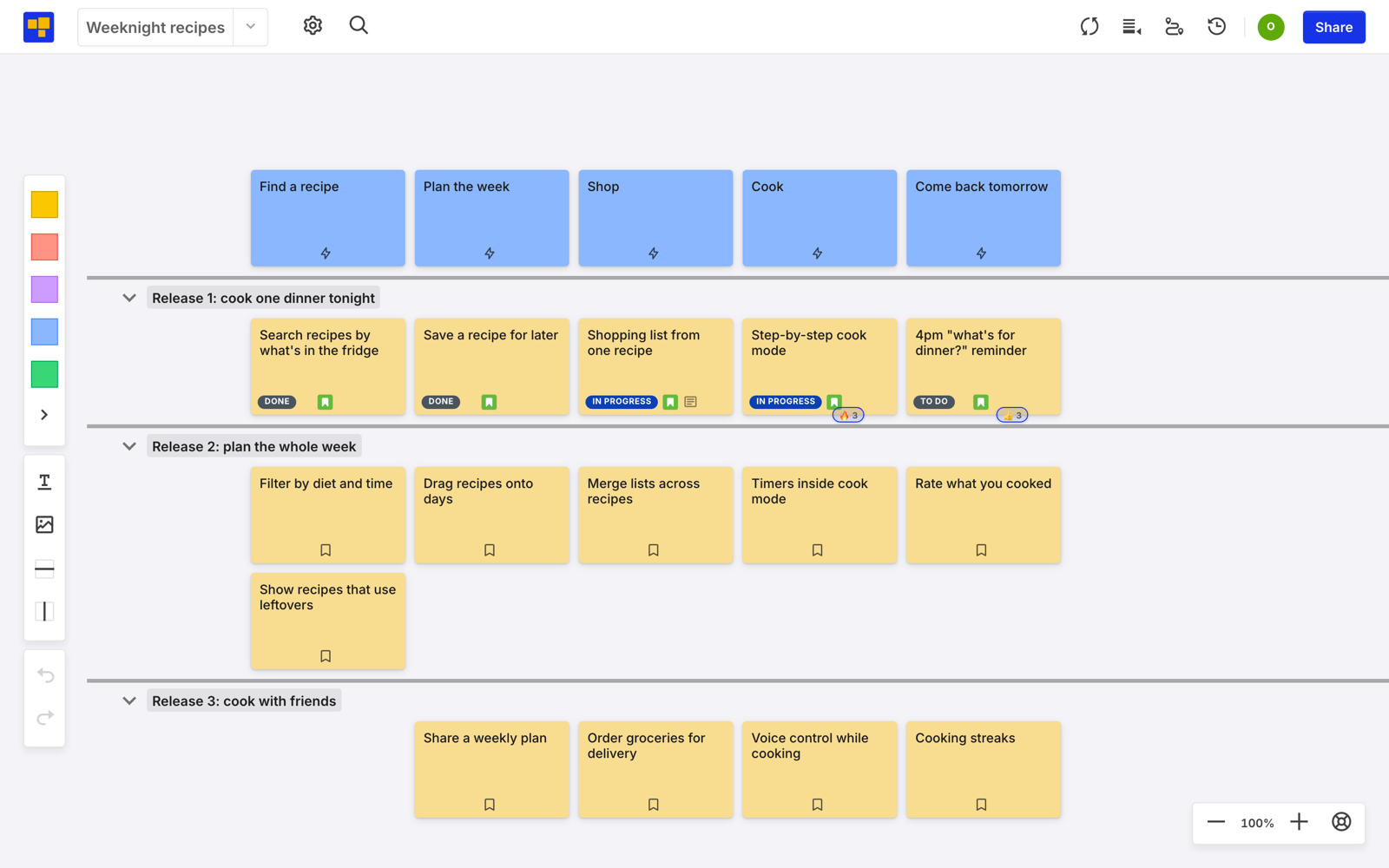
After the session, comments on each card hold the conversation that produced it, and acceptance criteria go in the card’s own field. If the board is connected to Jira or Azure DevOps, the stories you commit to can link straight into the backlog. On a long map, collapse the slices you aren’t working on.
The second session goes faster than the first, and by the third you’ll stop looking at the steps. The backbone will still be wrong the first time. That part never changes, and it isn’t supposed to.
Start free. Three boards, no credit card.